Custom Form Beta - External Lookup via API | Community
Skip to main content
theffernan
Level 2
Jan 28, 2024 6:13 PM UTC
Solved

Custom Form Beta - External Lookup via API

Hi,

Interested in setting up a simple Proof of Concept to demonstrate the functionality of the External Lookup field.

  1. Has anybody tried this yet?
  2. Does Adobe have any sandbox resources to build a small client facing demo or are there any recommended/recognized APIs that would be suited to this task? 

Cheers!

This post is no longer active and is closed to new replies. Need help? Start a new post to ask your question.
lgaertner
lgaertnerAccepted solution
Level 9
Jan 29, 2024 8:30 AM UTC

Hi,


yes, it's not as complicated as it seems at first glance.


You will be only able to setup an external lookup field using the new (beta) form designer.

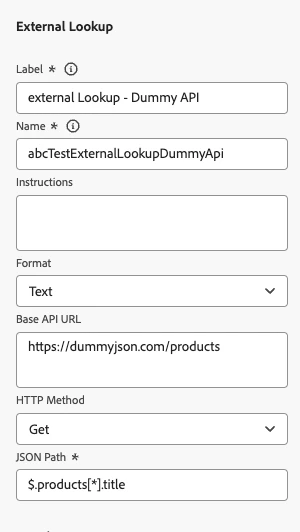
You can try using a dummy API like this:

https://dummyjson.com/products 


If you have a look at the output in your browser, you will see, that it has the following format:


{ "products": [ { "id": 1, "title": "iPhone 9", "description": "xyz", ... ] }


So, to get the titles into the new field, you have to use the following JSON path:


$.products[*].title


Regards

Lars

3 replies

New Participant
Nov 5, 2024 10:42 PM UTC

I have a scratch custom form and testing project with that custom form on it.  That is where I test and create proof of concept and tweak them as needed for custom forms in production.


One POC I am running some tests for is a sub category set of choices that are dependent on the primary category choices. I have gotten a one to one work and am now working on a multiple to multiple.

Translate
lgaertner
lgaertnerAccepted solution
Level 9
Jan 29, 2024 8:30 AM UTC

Hi,


yes, it's not as complicated as it seems at first glance.


You will be only able to setup an external lookup field using the new (beta) form designer.

You can try using a dummy API like this:

https://dummyjson.com/products 


If you have a look at the output in your browser, you will see, that it has the following format:


{ "products": [ { "id": 1, "title": "iPhone 9", "description": "xyz", ... ] }


So, to get the titles into the new field, you have to use the following JSON path:


$.products[*].title


Regards

Lars

Translate
theffernan
Level 2
Jan 29, 2024 1:29 PM UTC

Lars, Thank you very much!

Translate