Customize Task Creation Screen | Community
Skip to main content
New Participant
March 14, 2023
Solved

Customize Task Creation Screen

  • March 14, 2023
  • 2 replies
  • 1337 views

Hello,


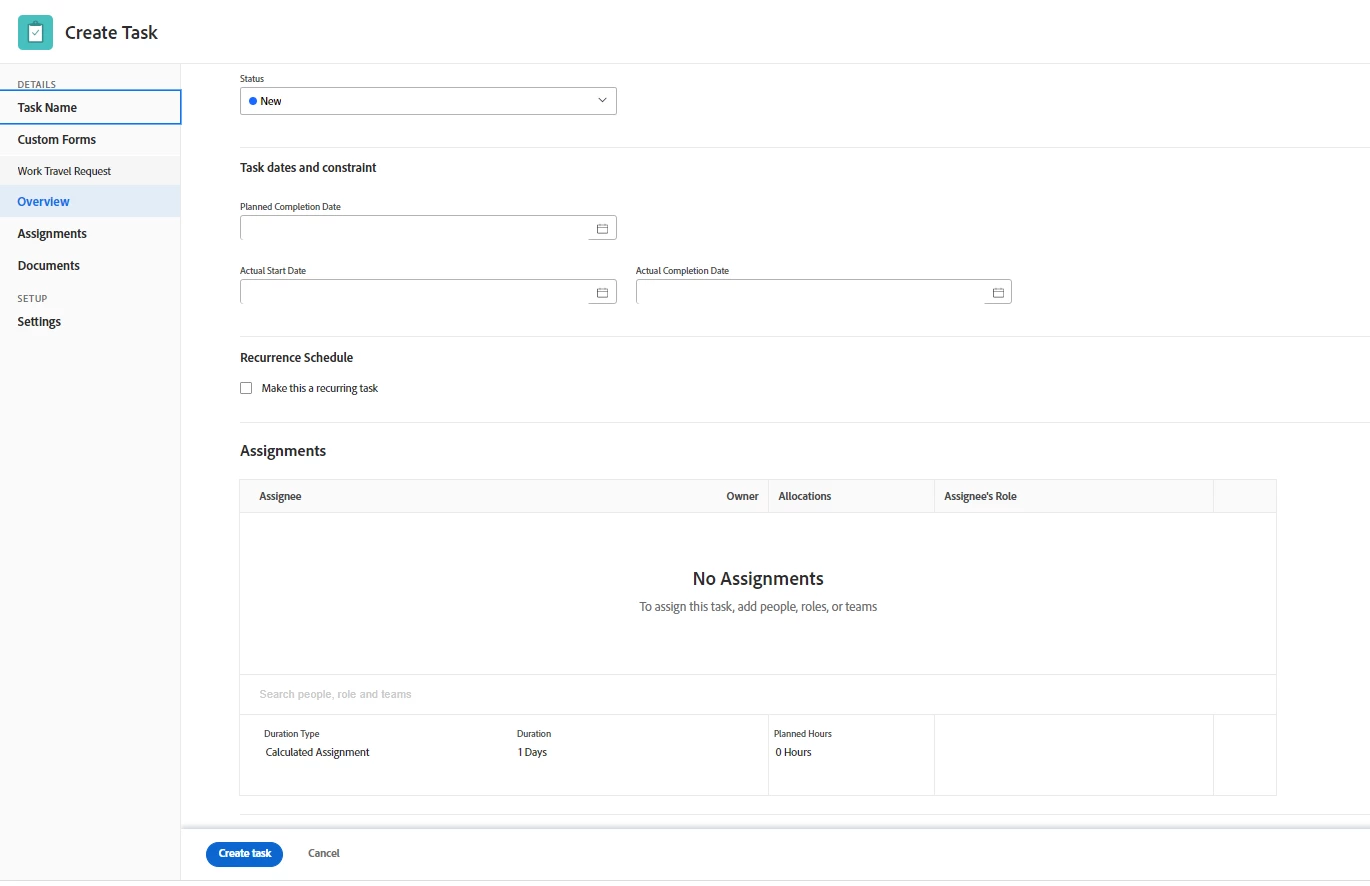
I am wanting to customize what my team sees in the task creation menus. I am able to attach a custom form, but I want to hide sections such as Task Dates and Constraints, Assignments, etc. as seen in the image below. My team does not use all of these options, so I want to "de-clutter" the screen for them. This seems like an issue that would be solvable in Layout Templates, but I cannot find where to customize these specific options. The Layout Template for Tasks only allows me to customize the Task Details once the Task is already created. If this is possible, please let me know. Any help would be appreciated! Thanks!



This post is no longer active and is closed to new replies. Need help? Start a new post to ask your question.
Best answer by Heather_Kulbacki

Depending on the number of fields on your custom form (and the logic on those fields), as Madalyn mentioned a View might be your best option since there's no way to edit what shows in that New Task window that pops up when creating a new task.

Instead of having users click the New Task button at the top of a task list, have them click either Add More Tasks (at the bottom of the task list) or have them select an existing task and click the Insert Task Above/Below buttons. 

Then create a view that shows them just the fields they need to fill in. They can start with the first column in that task view, fill in data and tab to the next one, working their way across the columns.

2 replies

Madalyn_Destafney
New Participant
March 14, 2023

This is all managed in a layout template (Setup > Interface > Layout Templates). You can customize what users see in main menu, projects, tasks, even their filters/views/groupings available from many pages like the reports, portfolios, programs pages. 

If this helped you, please mark correct to help others : )
Tgore08Author
New Participant
March 15, 2023

Thank you for your response @madalyn_destafney . Unfortunately, I believe the Task layout template only allows me to customize what a Task looks like after it is created. I am wanting to clean up what options display during the task creation process. I have included a screen shot of what I see on the Task layout template screen. Perhaps I am just missing where I need to go.


Madalyn_Destafney
New Participant
March 15, 2023

That is the correct area in layout templates...
Maybe are you referring to a task View? The columns of data in a project the user enters when creating a task in the project? 

If this helped you, please mark correct to help others : )
Richard__Carlson
New Participant
March 14, 2023

If you assign a layout template you should be able to do this.


Customize what users see -> Project

change to 

Customize what users see -> Task