Deleted Items in Home/Summary | Community
Skip to main content
Level 3
Feb 25, 2021 4:50 PM UTC
Solved

Deleted Items in Home/Summary

I have the option of hiding completed items from my home task list but for some reason if a project is deleted/cancelled - those tasks/approvals stay in my home screen. Is there a way to remove them?

This post is no longer active and is closed to new replies. Need help? Start a new post to ask your question.
imgrund
imgrundAccepted solution
Employee
Feb 25, 2021 5:57 PM UTC

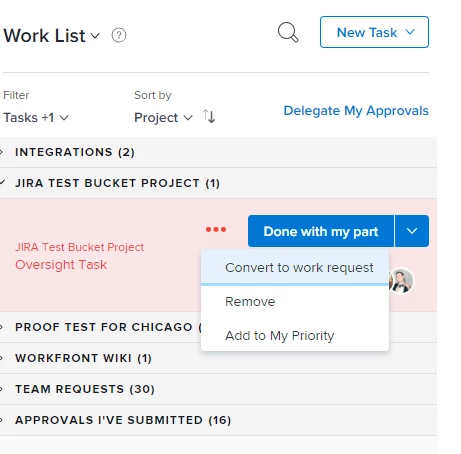
I believe this happens when you have committed to a work item. If you go to the three dots on the task, there is a convert to work item (and if the project is deleted it will go away and only come back when back in Current). Or you can just remove. In your case, remove would be okay. But I usually recommend to my users to use Convert to Work Request in case the project comes back to life.

2 replies

imgrund
imgrundAccepted solution
Employee
Feb 25, 2021 5:57 PM UTC

I believe this happens when you have committed to a work item. If you go to the three dots on the task, there is a convert to work item (and if the project is deleted it will go away and only come back when back in Current). Or you can just remove. In your case, remove would be okay. But I usually recommend to my users to use Convert to Work Request in case the project comes back to life.

Translate
SaraAl2Author
Level 3
Feb 25, 2021 8:08 PM UTC

Thank you!! For some reason I do not have the "Remove" Option. However, I was able to go to the project and just remove the assignment. Worked well enough! Appreciate the direction.

Translate