External URL in a Dashboard pointing to a WF Dashboard | Community
Skip to main content
New Participant
July 6, 2023
Solved

External URL in a Dashboard pointing to a WF Dashboard

  • July 6, 2023
  • 2 replies
  • 1466 views

Our users have long enjoyed the ability for us to put "External Links" on their Dashboards (with a height of 1) that basically acted like links to other dashboards in Workfront.

For example "Team Activities" shown here is a link to a Dashboard inside of Workfront, and it works still because it was created awhile back.

However we can't change it and we can't create new links like it. 


Only recently, I've started to get error messages preventing that say this is no longer allowed. (please see screenshot).
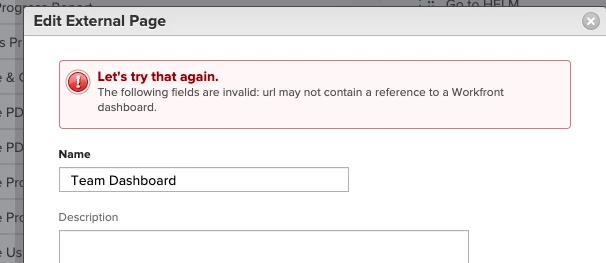
Is this intentional? Our pain point is ...now we have some existing Links on these Dashboards that still work, because they were created before this restriction was put in place. But we can't edit them nor create new ones for our users. What was the rationale behind adding this restriction, and can it be pulled back? This is perceived as a drop in service level by our users. (Workaround to use TinyURL is a possibility but not ideal.)



This post is no longer active and is closed to new replies. Need help? Start a new post to ask your question.
Best answer by Doug_Den_Hoed__AtAppStore


Hi @mylah_d,


As I recall, the ability to embed dashboards was revoked for performance reasons.


Think "iceberg". Although your example is allowing the tip of the dashboards of interest to "peek out" in order for users to then click and navigate to them, "below the waterline" the entire dashboard is also being rendered, when in many cases (such as your example) the results of that render cannot even be observed. Add that up across all of the Workfront domains, and...yeah. Revoked.


Instead, I suggest you create a report of dashboards (in order to see the clickable dashboard links you're really after), and then drop that report in place of the external referenced dashboards, effectively giving end users a comparable (albeit more "vertical") experience.


Alternatively, if the existing positioning is important enough to you, you could create a pdf laid out however you wish (even a picture) with hotspot hyperlinks to the dashboards of interest in it, upload it to Workfront, copy the url of its location, and set the containing dashboard's external page to point to that document, thereby preserving (or even improving) the user's experience; although I'd suggest also reviewing my [Ctrl]+click trick reply from earlier today, too.


I hope this gives you some context and options, am interested to hear what you end up pursuing, and how it turns out. Good luck!


Regards,

Doug


2 replies

Charleigh_L
New Participant
July 7, 2023

Hi Mylah,

Another idea to consider is to utilize the ability for custom navigation on the left hand side of objects to be built into user templates. For instance, if they are in 'Dashboards' instead of just Mine and All dashboards on the left you can build it so that navigation includes your more useful custom dashboards like that team dashboard etc.

Doug_Den_Hoed__AtAppStore
Doug_Den_Hoed__AtAppStoreAccepted solution
New Participant
July 6, 2023


Hi @mylah_d,


As I recall, the ability to embed dashboards was revoked for performance reasons.


Think "iceberg". Although your example is allowing the tip of the dashboards of interest to "peek out" in order for users to then click and navigate to them, "below the waterline" the entire dashboard is also being rendered, when in many cases (such as your example) the results of that render cannot even be observed. Add that up across all of the Workfront domains, and...yeah. Revoked.


Instead, I suggest you create a report of dashboards (in order to see the clickable dashboard links you're really after), and then drop that report in place of the external referenced dashboards, effectively giving end users a comparable (albeit more "vertical") experience.


Alternatively, if the existing positioning is important enough to you, you could create a pdf laid out however you wish (even a picture) with hotspot hyperlinks to the dashboards of interest in it, upload it to Workfront, copy the url of its location, and set the containing dashboard's external page to point to that document, thereby preserving (or even improving) the user's experience; although I'd suggest also reviewing my [Ctrl]+click trick reply from earlier today, too.


I hope this gives you some context and options, am interested to hear what you end up pursuing, and how it turns out. Good luck!


Regards,

Doug


Mylah_DAuthor
New Participant
July 6, 2023

Thanks. I hear you on performance. Our users just really like the placement and savings to screen real-estate (and it's always a little jarring for the user experience to no longer be able to do something you used to be able to do). I might try the PDF idea (since they don't like Dashboard Reports, which we occasionally use too), so thanks for that. And maybe one day the new Reporting canvas will allow for the insertion of links just for this purpose? Anyway, thanks for chiming in!


Best,
Mylah