Gantt Chart Calendar Question | Community
Skip to main content
New Participant
May 7, 2025

Gantt Chart Calendar Question

  • May 7, 2025
  • 2 replies
  • 529 views

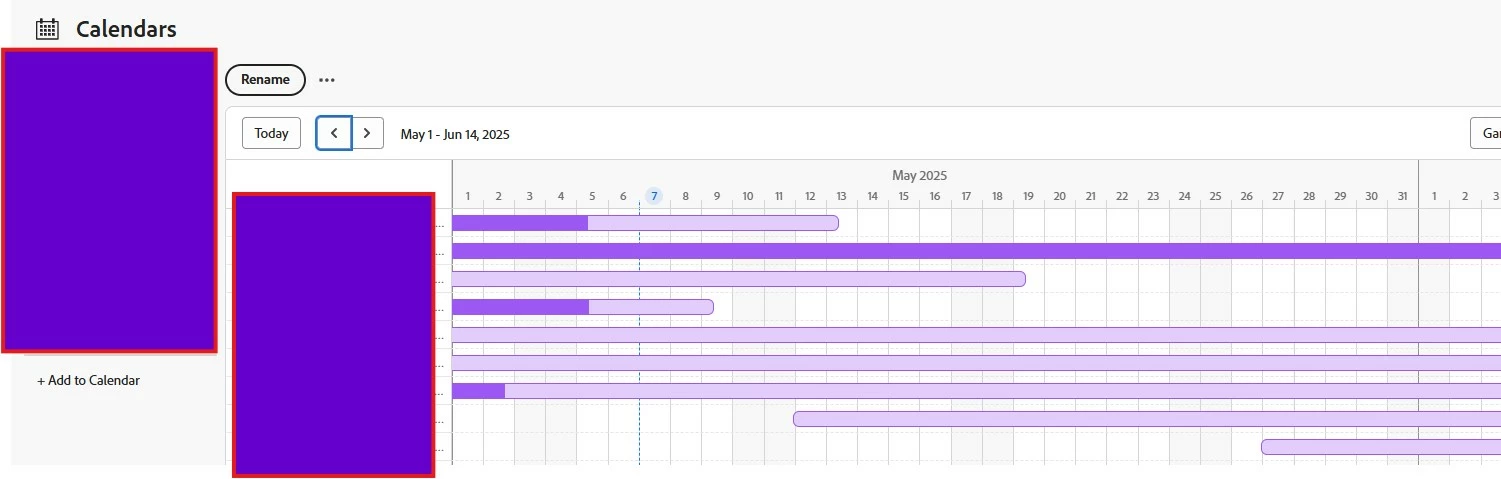
What's the difference between the darker and lighter shading when viewing projects in the calendar? Thanks!
2 replies

kautuk_sahni
Employee
July 16, 2025

@susannovotney Just checking in — were you able to resolve your issue?
We’d love to hear how things worked out. If the suggestions above helped, marking a response as correct can guide others with similar questions. And if you found another solution, feel free to share it — your insights could really benefit the community. Thanks again for being part of the conversation!

Kautuk Sahni
Madalyn_Destafney
New Participant
May 7, 2025

It indicates the % complete. You can turn that off/on in the Gantt settings (gear icon top right when in a Gantt view).

If this helped you, please mark correct to help others : )
New Participant
May 7, 2025

Thank you, Madalyn. I am not seeing the gear icon, but I believe I did yesterday, and it wasn't changing the coloring. I have had some issues with the gantt displaying so wondering if there's just some bugs going on right now. I'll keep an eye out!

Madalyn_Destafney
New Participant
May 7, 2025

Go into  your Gantt view and see the gear in upper right next to print icon. The % complete is what is causing the shading. The bar is the duration of the whole project/task/etc and the darker color within it is the % complete.

If this helped you, please mark correct to help others : )