Group by value/no value | Community
Skip to main content
michelleb526471
New Participant
April 30, 2024
Solved

Group by value/no value

  • April 30, 2024
  • 2 replies
  • 682 views

Hey all,
Apologies if this has already been covered but I can't find anything. 
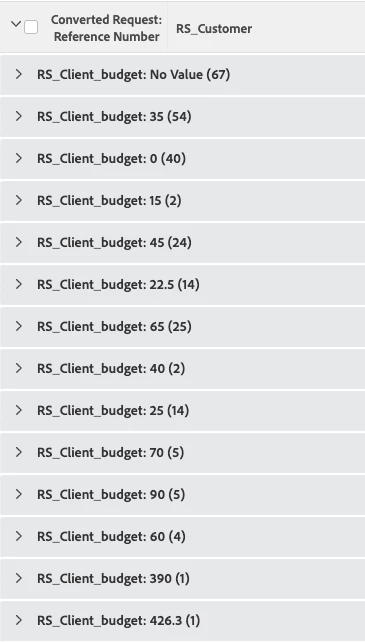
I have a report, that's grouped by the client's budget (brought in from request field), this is either empty, £0 or £XX
I would like this to be just two groups.
Group 1: empty or £0 budget
Group 2: is more than £0

Tried my hand in the text editor but couldn't get anything to work...

Thanks in advanced!
Screenshot below
This post is no longer active and is closed to new replies. Need help? Start a new post to ask your question.
Best answer by Heather_Kulbacki

@michelleb526471  give this text mode grouping a try:


group.0.linkedname=direct
group.0.namekey=DE:Your Custom Field Name
group.0.valueexpression=IF({DE:Your Custom Field Name}>0,'more than £0','empty or £0','')
group.0.valueformat=doubleAsString
textmode=true

2 replies

Heather_Kulbacki
Heather_KulbackiAccepted solution
New Participant
May 10, 2024

@michelleb526471  give this text mode grouping a try:


group.0.linkedname=direct
group.0.namekey=DE:Your Custom Field Name
group.0.valueexpression=IF({DE:Your Custom Field Name}>0,'more than £0','empty or £0','')
group.0.valueformat=doubleAsString
textmode=true

Madalyn_Destafney
New Participant
April 30, 2024

Hello, the way I'd go about this is to add a calculated custom field in the same custom form where the client budget field lives, say it's called 'Client Budget Calculated Field.' Have this field reference the client budget field with a calculation if budget greater or equal to X, show as Y. If less than A, show as B. 

Then your grouping in the report would be grouping by this new 'Client Budget Calculated Field' Is Not Blank to pull in where this field has a value. 

If this helped you, please mark correct to help others : )