Help in Calculated FIeld for Priority set up | Community
Skip to main content
Kundanism
New Participant
November 14, 2022
Solved

Help in Calculated FIeld for Priority set up

  • November 14, 2022
  • 1 reply
  • 732 views

Hi,

Looking for HELP in Calculated Field in project custom form, created a field name "Score", and conditions are;


If Calculated Score =600, Then Priority=Urgent
If Calculated Score <600, but more than 499, Then Priority=High
If Calculated Score <500 but More Than 249, Then Priority=Medium
If Calculated Score <250, Then Priority=Low


I tried this one, but not showing priority in the report/project;

IF({DE:Calculated Score}=600, "Urgent", IF({DE:Calculated Score}<600, "High", IF({DE:Calculated Score}<500, IF({DE:Calculated Score}<250,"Low"), "Medium")))
 
Am I missing in between, appreciate your immediate help in this regard.
Best regards,
Kundan.

This post is no longer active and is closed to new replies. Need help? Start a new post to ask your question.
Best answer by _Manish_Singh

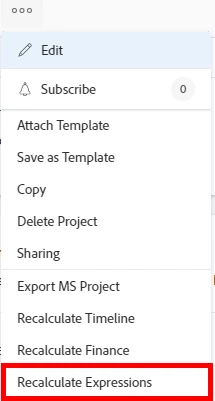
Try this please and use "Recalculate Expressions" on project or project report: 

IF({DE:Calculated Score}=600,"Urgent",IF({DE:Calculated Score}<250,"Low",IF({DE:Calculated Score}<500,"Medium",IF({DE:Calculated Score}<600,"High"))))

1 reply

_Manish_Singh
_Manish_SinghAccepted solution
New Participant
November 14, 2022

Try this please and use "Recalculate Expressions" on project or project report: 

IF({DE:Calculated Score}=600,"Urgent",IF({DE:Calculated Score}<250,"Low",IF({DE:Calculated Score}<500,"Medium",IF({DE:Calculated Score}<600,"High"))))

Kundanism
KundanismAuthor
New Participant
November 15, 2022

Thanks a lot @_manish_singh 

Have a nice day!

Mvh

Kundan.

RandyRoberts
New Participant
November 16, 2022

I think the thing to remember here is that when a multi IF statement finds it's first match, it stops looking at the remaining IFs. You'll notice in this working statement, there is no "else" because it doesn't need one.