
How can I get the field ID of a Workfront Planning field? | Community
Skip to main content
karinasaijo
Level 2
Jan 16, 2025 2:30 AM UTC
Solved

How can I get the field ID of a Workfront Planning field?

Dear community,


I'm trying to create an external look up field for the Workfront Planning API, and in the instructions it says that I should add:

  • JSON Path: $.records[*].data.{fieldID}

    {fieldID} is the field to display in the External lookup search results on the custom form for end users.

Can anyone help me understand what is exactly the fieldID? Is it the WF Planning field ID? If so, how can I get it? I was not able to find it.


Thanks in advance!
monicacardosoAccepted solution
Employee
Jan 23, 2025 6:04 PM UTC

Hi @karinasaijo, 


Thank you for your question! The section of the article that you're looking at provides an example to pull the fieldID into the External lookup search results. You wouldn't need to know the fieldID, since that is what will be returned.


The base API URL will be: 


$$HOST/maestro/api/v1/records/search?recordTypeId={recordTypeID}


So you would need to know the recordTypeID. In order to retrieve that, run this call in your browser: 


https://<domain>.my.workfront.com/maestro/api/record-types?workspaceId={workspaceID}


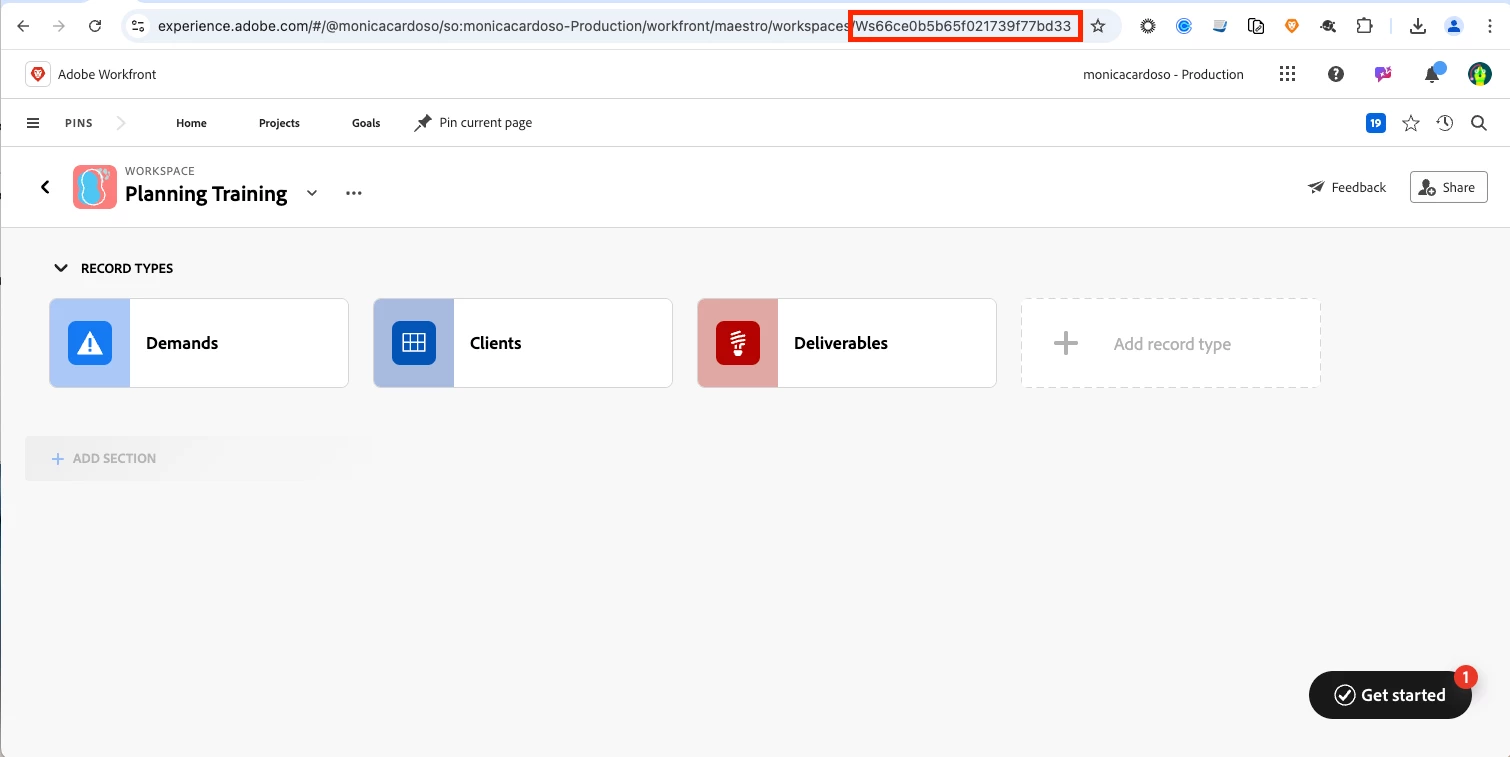
For workspace ID, you can navigate to it in Workfront and grab the ID from the URL: 


Running the API call above would return a different ID for Demands, Clients and Deliverables that I could plugin to base API URL.


- Monica

7 replies

monicacardosoAccepted solution
Employee
Jan 23, 2025 6:04 PM UTC

Hi @karinasaijo, 


Thank you for your question! The section of the article that you're looking at provides an example to pull the fieldID into the External lookup search results. You wouldn't need to know the fieldID, since that is what will be returned.


The base API URL will be: 


$$HOST/maestro/api/v1/records/search?recordTypeId={recordTypeID}


So you would need to know the recordTypeID. In order to retrieve that, run this call in your browser: 


https://<domain>.my.workfront.com/maestro/api/record-types?workspaceId={workspaceID}


For workspace ID, you can navigate to it in Workfront and grab the ID from the URL: 


Running the API call above would return a different ID for Demands, Clients and Deliverables that I could plugin to base API URL.


- Monica

Translate
New Participant
Jan 23, 2025 6:20 PM UTC

Great answer Monica,


Maybe you know, how to filter out records via get parameters?

https://developer.adobe.com/wf-planning/api/v1/#tag/Records/operation/searchRecordsGet

documentation says that we have filters param 

string

Filters

but I cannot find out how to build this filters string


Thanks

Translate
Employee
Jan 24, 2025 4:21 PM UTC

The search modifiers are listed in our article below:


https://experienceleague.adobe.com/en/docs/workfront/using/adobe-workfront-planning/adobe-workfront-planning-general-information/planning-api-basics#field-types-and-search-modifiers-used-with-them


You can use those in the "filters" parameter. There is also an example request body in that article that you can look at. 

Translate