How to change currency in Project template? | Community
Skip to main content
New Participant
July 21, 2023
Solved

How to change currency in Project template?

  • July 21, 2023
  • 2 replies
  • 1109 views

Hi, how do you change the currency in a Project template? I'd like all the expenses from Projects created from that template to be the currency I specified in the template.


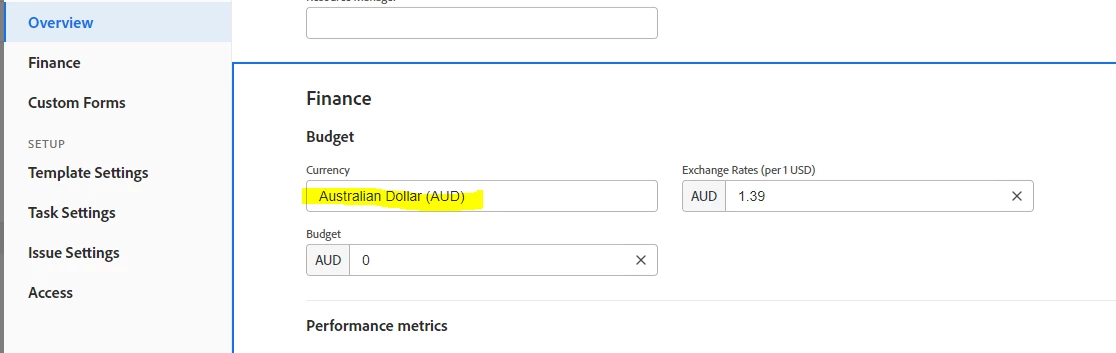
I have changed it in the template to AUD. However, when I record my Expenses down. It is still based in USD.
 

This post is no longer active and is closed to new replies. Need help? Start a new post to ask your question.
Best answer by stan255

In that case, I recommend submitting a ticket to support so they can look into this further. Something looks off to me.


I discovered the issue. I toggled the currency field off in the template and that defaulted the currency back to USD.

2 replies

Lyndsy-Denk
New Participant
July 21, 2023

Keep in mind that changing a project template today doesn't update projects created from that template before today. If you need to update past projects, I recommend creating a report to capture those projects to update things. However, keep in mind that, according to Change the project currency | Adobe Workfront, you can't change the currency of a project if there is existing financial data in that project.

stan255Author
New Participant
July 23, 2023

@vicsellers and @lyndsy-denk So I created a new Project again from the template (yes, template's currency is in AUD) and Expenses are still in USD.


See screenshot below. Sorry a bit small because I had to zoom out to show both the USD and AUD numbers.


Lyndsy-Denk
New Participant
July 24, 2023

In that case, I recommend submitting a ticket to support so they can look into this further. Something looks off to me.

VicSellers
New Participant
July 21, 2023

Hi @stan255 - There are a couple places you might want to check to troubleshoot this.

  1. The created project carried the currency over from the template correctly
  2. On the View tab within expenses for both the template and created project, check that it is set on the Australian currency. I have a screenshot below and am to toggle between US and Singapore dollar on my test project even though I have it set to Singapore currency