
How to create a Text Box for Issue Reference Number in Report Prompt for "Issue Type Report"? | Community
Skip to main content
Kundanism
Level 10
Nov 4, 2020 9:13 AM UTC
Question

How to create a Text Box for Issue Reference Number in Report Prompt for "Issue Type Report"?

Hello to All,

Tried to create a text box for asking user to enter Issue Reference No., so it shows a text box as required input in Custom Prompt. But it does not shows as Text box which asks about reference number as input input . Looking for your guidance and expertise in this regard.
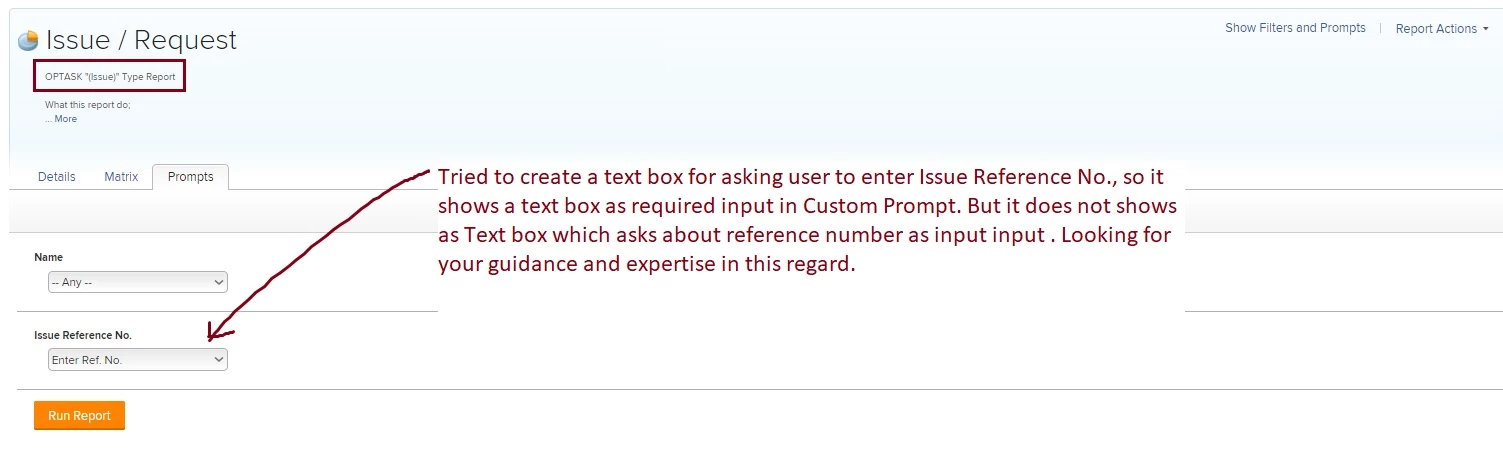
Please refer the attachment for a quick reference.

Best regards,

Kundan

This post is no longer active and is closed to new replies. Need help? Start a new post to ask your question.

5 replies

New Participant
Nov 4, 2020 2:54 PM UTC

Hi Kundan,

The way that custom prompts work is by predefining the filter criteria (using text mode) that users can choose from. You are effectively hardcoding a list of options for the user to choose. For this reason you are not able to have a text box in a custom prompt as this would mean that the user is not using a predefined list.

The way to output a text box for Issue reference number is to use a standard prompt using the below option:

When I use this option, I am presented the below prompt options on the report where I am able to say that the Reference number equals - Whatever is entered within the text box next to it:

Best Regards,

Rich

Translate
Kundanism
KundanismAuthor
Level 10
Nov 5, 2020 9:01 AM UTC

Thanks for your help @Richard Leek‚

Would you thing this can be possible by using some sort of custom form? Just an idea.

Mvh (Best regards)

Kundan.

Translate
New Participant
Nov 5, 2020 10:26 AM UTC

Hi Kundan,

The prompt functionality will work the same regardless of whether you use a custom field or not.

You could create a custom field for users to populate a reference number, but this wont change how the prompts work within your report.

Best Regards,

Rich.

Translate