How to report when form is not attached to task? | Community
Skip to main content
Level 6
Feb 2, 2022 9:36 PM UTC
Solved

How to report when form is not attached to task?

I need a report that shows tasks from a business unit's projects that do not have a custom form attached. Any suggestions on the best way to tackle this?

This post is no longer active and is closed to new replies. Need help? Start a new post to ask your question.
Ali_Pentico
Ali_PenticoAccepted solution
Level 2
Feb 2, 2022 11:17 PM UTC

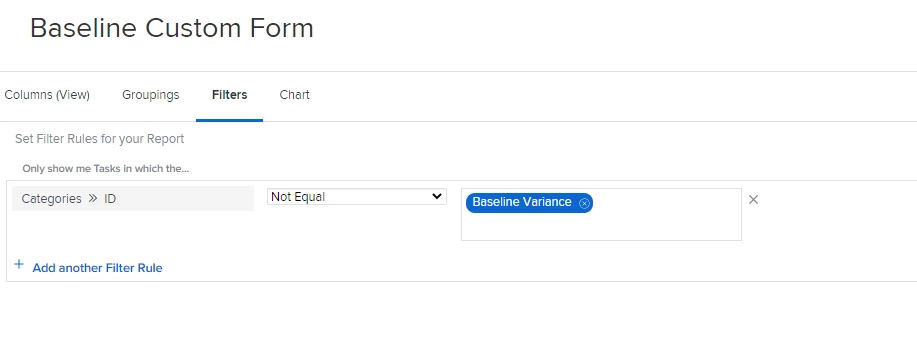
Hi Catherine. If you are looking to see tasks that are missing a particular custom form, you can create a task report/filter and use Categories > ID and then Not Equal to "Form Name". Using the Categories (plural) will search all custom forms attached - rather than just the first. If you are wanting to see tasks without any custom forms attached, you can use Categories > ID Is Blank. Hope this helps!

3 replies

Level 10
Feb 3, 2022 1:27 PM UTC

What Al said, or change the grouping to categories and those with no form will be “no value”

Translate
Ali_Pentico
Ali_PenticoAccepted solution
Level 2
Feb 2, 2022 11:17 PM UTC

Hi Catherine. If you are looking to see tasks that are missing a particular custom form, you can create a task report/filter and use Categories > ID and then Not Equal to "Form Name". Using the Categories (plural) will search all custom forms attached - rather than just the first. If you are wanting to see tasks without any custom forms attached, you can use Categories > ID Is Blank. Hope this helps!

Translate
Level 6
Feb 3, 2022 2:17 PM UTC

Thanks so much @Ali Pentico‚ this is exactly what I needed - to isolate specific tasks that were missing a specific form.

Greatly appreciate the help!

Translate