
Monthly Hot Topics from your Workfront Scale Customer Success Team | Community
Skip to main content
CynthiaBoon
Employee
October 4, 2023

Monthly Hot Topics from your Workfront Scale Customer Success Team

  • October 4, 2023
  • 28 replies
  • 20575 views

Welcome to our Monthly Hot Topics Blog!  

First things first – if you’ve seen our Hot Topics posts in the past, you may have noticed that this update is posted as a Blog instead of a Discussion.  

Why did we do that? Our hope is to make our recurring updates and our series updates easier for you to find, AND to provide a way for any “non-Sys Admins” to receive notifications when we share upcoming events and hot topic posts.  

How will this work? Each month we’re going to post a new Comment with all the latest events, news, and posts to (hopefully) make finding updates much easier.  

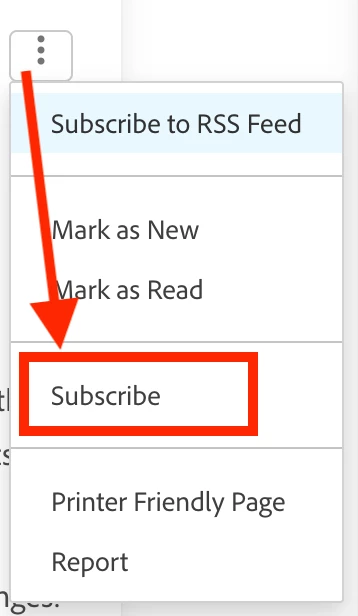
To make sure you get the latest, you’ll want to subscribe (and make sure to encourage your Group Admins and Power Users to subscribe too). How do you do that?

  1. Click the 3 dots in the top right of this post. (It’s called the Kebab Menu! Just learned that today!) 
  2. Click Subscribe. 
  3. Then relax and wait for the notifications to come in every time we add a new comment to this post.  

Here’s a screenshot: 


If you have any questions in the meantime, please don’t hesitate to reach out via email at csatscale@adobe.comWe look forward to connecting with you! 

Cynthia, Leslie and Nichole 


Quick links to all the Hot Topic Posts! 

October 2025

September 2025

August 2025

July 2025

June 2025

May 2025

April 2025

March 2025

February 2025

January 2025

December 2024

November 2024

October 2024

September 2024

August 2024

July 2024

June 2024

May 2024

April 2024

March 2024

February 2024

January 2024

December 2023 

November 2023 

August + September + October 2023 

June + July 2023 

April + May 2023 

March 2023 

February 2023 

28 replies

CynthiaBoon
Employee
January 6, 2025

January 2025 Hot Topics 


We’re riding into the new year, Workfronters, so let’s get pumped! 

The first release is coming up fast! Don’t miss out on the new features listed on the First Quarter 2025 release overview page.  Our first event of the year is a webinar with Product to share the release items. Register today! 

Looking to try something new in the new year? Check out this new tutorial from the Experience League Documentation team. 

Another big event is coming up fast! Adobe Summit is just around the corner and the session catalog has been posted. The conference is back in Vegas, March 18–20, 2025, with preconference sessions scheduled for March 17.  

  • Register now to take advantage of the reduced price through February 13. 

Customer connections and stories are so meaningful, and we were lucky to have so many customers partner with us last year.  In December, we hosted a session that got everyone talking!  If you missed it, check out the recording. 

Did you miss our last Admin 101: Getting Workfront Data event? We collected some amazing best practices to share! 

  • If you don’t see the Blueprints icon, customize the Main Menu area of your Layout Template.  
  • To find the list of all built-in reports, go to the Reports area and select All Reports. Add a new filter for Entered by ID > Is Blank.   
  • To easily find or access your reports, considering using the Favorites or Recents menu, Pins, Creating Folders, Creating a dashboard with the report links, using a naming convention/code to easily search  
    • Add a Report Report to your dashboard so that you can see a list of all reports that are included within. Yes, a Report-Report!   
  • To edit or adjust report-creation access from users, edit Access Levels in the Setup area. In clicking on a specific access level, you can choose No Access, View, or Edit. Be sure to click on the gear icon to the right of Edit for all available options!   
  • If custom fields are no longer needed, consider moving them to an archived or admin-only section of your custom form so you don’t lose historical information. Learn more about section breaks and logic in this short video.   
  • There is a built-in view in your Reports area called “Report Usage” that will give you insight into how frequently reports are being used, and by whom.   
  • Always add a report description to your report. Not only is this searchable, but tip from the chat: Descriptions are a valuable asset to explain the report when you're not sitting next to the person viewing it  
  • Know your users and what works for them – some may prefer automatic report deliveries to remember what to look at whereas others may want a dashboard as their default landing page so it’s the first thing they see upon logging in to Workfront. Ask!   
  • Take all of the FREE training available on Experience League. Report creation takes time and a lot of practice! And if you are more of a hands-on learner, consider buying a seat for the 2-day instructor led Create Reports with Adobe Workfront bootcamp ($).   

Speaking of Admin 101, we’re restarting the series, and the first 2 events are open for registration: 

We hope to see you soon during our upcoming sessions.  Sign up today! 

See you in February! 

CynthiaBoon
Employee
December 2, 2024

December 2024 Hot Topics 

2024 has flown by Workfronters!  

It’s the time of year when we turn our thoughts to 2025.  Last month, we offered some sessions to give you some fresh ideas and get you prepped for the new year.  If you missed any, we have the recordings here: 

Even though we’re headed to the end of the year, we still have some live events on the calendar for you. 

We might be looking forward to a little break at the end of the month, but we can’t help but look forward to what’s coming in the first Product Release of 2025. 

Looking for a fresh perspective? Then look no further than the new addition to Experience League, Perspectives. These articles offer real-world use cases and best practices, written by your peers and Adobe product experts. Access the latest article below, written by our very own, @kristinfarwell

Speaking of fresh perspectives, don't miss the presentations from our fabulous customers, @lyndsy-denk  & @beckybarus,  during the in-person Skill Exchange in San Francisco last month. 

Interested in more good advice? Check out some ideas for 2025 Sys Admin Goals shared by customers during the EOY Reporting event: 

  • Implement the word “no” into my vocabulary, or even “Yes, but with a catch...”  
  • Overall system cleanup – layout templates, access level, groups, reports, etc.  
  • Getting new teams and departments into Workfront   
  • Automations and integrations – watch the on-demand webinar, Making the Case for Workfront Fusion if you’re interested in building a business case  
  • Standardizing request forms and dropdown options   
  • Create a “Hot Project” Custom Form 
    • Field 1: Is this project a priority? Yes/no (radio button)   
    • Field 2: Open text field to enter comments. These comments don't appear in the Update.  
    • The key for us was to build a view where Field 2 appears. Then a project owner can enter text, and it automatically attaches the custom form to the hot project. Then we have a report that lists any project that has the custom fields. 
  • Track all of your Workfront Sys Admin work to make that next step in your career.  Check out the on-demand customer panel, Advance Your Career with Workfront for more ideas! 

At the end of the month, the Scale Team will be taking a little Winter Break, but we’ll be back the first week in January with more events and hot topics.  While we are out, don’t hesitate to reach out to Customer Support with any issues. 

Workfront Customer Support is available 7 days a week, 24 hours a day, through the following numbers: 

  • US: 844-306-HELP(4357) 
  • EMEA: +44 1256 274200 
  • Australia: +61 1800 849259 

Have a fantastic December and are so excited to partner with all of you in 2025! 

Nichole, Leslie, and Cynthia 

CynthiaBoon
Employee
October 31, 2024

November 2024 Hot Topics 

It’s November, Workfronters! 

The year is flying by, so let’s not waste any more time and get right to the updates. 

We had some fantastic customer-led sessions in October, with more on the way! 

More free events are coming in November!  

More Top 3 Videos! 

Speaking of the comments sections, there’s GOLD in those areas of posts in the Community! Scroll down from the main post and check out the great advice.  

Get started with Priorities! We chatted about this new feature in our Collective and Round Up events, so just in case you missed it, here are some resources. 

 We'll post more Hot Topics the week of December 2nd!

CynthiaBoon
Employee
September 30, 2024

October 2024 Hot Topics 

Happy October Lions! Let’s head out to the pumpkin patch and check out all the new updates. 

Interested in hearing how other customers are using Workfront to support their organization's processes? Don't miss these events in October, where you will have a chance to get insight from other customers on their best practices, recommendations, and lessons learned.  

Want more? We have more free events where you can connect with other Workfront customers to ask questions, share solutions, and build your community of like-minded peers.  

We also have two new recorded events available on-demand! 

During the September Collective session, we discussed ideas around schedules and time-tracking.  Check out the advice shared by customers during the event:  

  • To view time off, consider building a Time Off report or use a Calendar report to pull in the users’ names and dates for quick visibility.  
  • Automatically capture the original project timeline (dates) when it moves to a Current status using baselines. This is a great way to compare original vs current state to understand what dates have changed.  
  • For schedules, if considering client schedules, you can add a schedule for their unique days off, and then “assign” this schedule to a “client” user.  Once assigned to this schedule, then their tasks will take into account their days off which are different from ours. 
  • For different time zones, think about some different approaches using the system:  
    • Define Time Zones: When setting up the schedule, you can specify the time zone for each user or group. This ensures that tasks and deadlines are aligned with the local time of the users involved.  
    • For Users schedule, navigate to the User's Profile: Go to the "People" section in Workfront and select the user whose time zone you want to view or update. And when you pull the user in a project, it goes of a user's time zone.  
    • Time Zone Setting: In the user details, you will find a field for the time zone. You can select the appropriate time zone from the dropdown menu. 

Hope to see you at events in October! 

CynthiaBoon
Employee
September 3, 2024

September 2024 Hot Topics 

Just like the song says...🎶🎶🎶Ba-dee-ya...Dancing in September....🎶🎶🎶  Let’s get dancing with the latest updates! 

Did you miss the Workfront Skill Exchange in August? Subscribe to the Event Follow-up post to get the latest updates and notifications of the recordings. 

Hot off the press! Skill Exchange recordings are available on demand!

August is full of vacations and back to school prep, so just in case you missed our other events, here are the links to those sessions. 

Speaking of events, you won’t want to miss the sessions we have scheduled for September.  Make sure to register today! 

Short on time? We posted more short videos in August, including a great customer use case from @kierstenkollins!

Did you miss our last Workfront Collective? We crowdsourced lots of ideas, including managing tasks pending completion, using calendars to maximize workflows, and the deprecation of Legacy Home.  Just in case you hadn’t heard the news, Legacy Home will be deprecated during the 24.10 release (planned for October 17, 2024).   

Not sure if your users are ready? Here are some of the ideas we discussed during our session. 
How to check and see if users are still using “old” home:  

  • Use Text Mode to add this view to your User Report / User list. (Quick reminder that text mode doesn’t always love copy/paste, so you may have to type it from scratch if you get errors.)  Thanks Randy & Katherine for sharing this during the session!  

Text Mode option 1 


displayname=Workspace opt-in  
listdelimiter=<div>  
listmethod=nested(userPrefValues).lists  
textmode=true  
type=iterate  
valueexpression=IF(IN("home-workspaces-opt-in",{name}),CONCAT({name}," - ",{value}))  
valueformat=HTML  

Text Mode option 2 


EXISTS:a:$$OBJCODE=USERPF  
EXISTS:a:name=home-workspaces-opt-in  
EXISTS:a:userID=FIELD:ID  
EXISTS:a:value_Mod=notnull  

  • Also, if you aren’t sure if your users are ready for New Home, you always have the option to set the Landing Page as a Dashboard if that works better for your team.  Here are the steps:  
  • To add a dashboard as the Landing Page, from the Layout Template, click the drop-down arrow in the Lange Page section. 
    • Click Add Dashboard at the bottom of the list, then do the following:  
    • Type a name for the dashboard in the Quick link name field.  
    • Start typing the name of an existing dashboard in the Choose a Dashboard field, then click the dashboard when it displays in the list.  
      • TIP - You must build the dashboard before it appears in the list. 
  • Looking for more info? Check out the article - Legacy Home deprecation guide.  


See you in October with more updates! 


CynthiaBoon
Employee
August 2, 2024

August 2024 Hot Topics 

Go for the Gold, Workfronters! 

It’s August and we have Olympic fever so let’s get straight to the resources that will help you cross the finish line. 

Upcoming Events: First things first – we have a ton of events coming up that you won’t want to miss! 

On-Demand Events: Just in case you did miss these incredibly popular events in July, we have the recordings ready for you, on-demand!  

New Blueprints! The team released two new Blueprints, and they are already getting great reviews! 

Can’t Miss Posts! There is always something great being shared on the Workfront Community so here are just a few samples. 

Teamwork Makes the Dream Work! Did you miss our July Connect: Admin Chat for Marketing & Creative event? Customers shared tons of best practices during our discussion that we wanted to share with everyone! 

  • Simplifying work, processes, and overall system management   
    • Minimize the number of job roles! The more basic a role is, the better.  
    • Consider Workfront Fusion to automate routine work or manual, time consuming processes. Don’t have Fusion but want to learn more about building the business case? Join us on August 27 for a session on Making the Case for Workfront Fusion.  
    • Turn off unwanted email notifications and encourage your users to only keep what is necessary – they have the freedom to edit their notifications in their profile.  
    • Build yourself a Maintenance project so you can stay up to date on current processes and general system cleanup. Not sure where to start? Check out this post on the Experience League Community, Year End Activities & Maintenance.  
    • Utilize the favorites area, pins, dashboards, and layout templates to simplify the user experience and your own personal navigation.  
  • Best practices for refining creative request forms while keeping historical data  
    • Leverage Section Breaks to hide old or archived fields so that only relevant information is shown to users filling out the form (this will retain historical data).  
    • Avoid renaming fields, if possible, so that integrations are not impacted.  
    • We’d love for you to share your creative brief processes, examples and best practices on the Community Coffee Break thread on Creative Briefs.   
  • Milestone paths  
    • Can give an at-a-glance view of project status, especially for leadership. Milestone view is great but it’s not exportable.  
    • Interested in giving it a try? Here’s a tutorial on creating a milestone path and milestone steps 
    • If you don’t like the built-in milestone functionality, you could set up your own via a custom form.  
  • Managing users no longer with the company  
    • Deactivate versus delete to retain historical data associated with that user.   
    • Install the Blueprint, Departing User Dashboard, so that you can easily re-assign or move work still associated with this user  
    • Consider building/using a User custom form to capture information like the date they were deactivated or other HR-related fields  
    • Utilize filters within the Users area to only show Active users  
    • Create custom views within the Users area to show user-specific information like access level, license, last login date, job role, home team, manager, etc.   

We’ll be posting new videos next week and are working on the September schedule now. Hope to see you all at an event soon! 


CynthiaBoon
Employee
July 10, 2024

July 2024 Hot Topics 

Welcome to the 2nd half of the year Workfronters!  It’s flying by, so let’s jump into the latest posts. 

Coming in hot! The 3rd Quarter (24.7) Release is launching next week, so check out these resources to be prepared. 

Reminder: The new Form Designer will replace the legacy form builder with this release.  Looking for more information? 

Surprise! Environment Promotion is here! Although not officially included in the release, a new feature is available for all Prime & Ultimate customers.  

Not sure when new you have access to new release features? Check out the documentation on how to Enable or Disable faster Workfront release cycles.  

  • 3rd Quarter - Fast Release Schedule: 
  • 24.5 (May 16, 2024) 
  • 24.6 (June 2024) 
  • 24.7 (July 2024) - This is also the date for those on Quarterly Releases. 

Looking for advice on preparing for releases? Look no further than the brilliant @moniqueevans 

Wanna join other Sys Admins and talk about the latest release features? Make sure to attend our upcoming event on July 18th, Learn: Adobe Workfront 3rd Quarter 2024 Release Round Up + Environment Promotion.  


Speaking of events! We’re just getting warmed up with our July events, so make sure to register for our upcoming free sessions! 

Contest alert! We have a fun Coffee Break planned this month on a topic that affects all Workfront Sys Admins – Creative Briefs! Looking for best practices or do you have a great approach to share? Please join us for our “text-only” event on July 16th at 10am PT.  

ICYMI! Here are some additional posts from the Community: 

Last BIG news! Mark your calendars – the Workfront Skill Exchange is coming soon, so don’t miss it! 


We’re working on more videos and more events for August, so stay tuned for next month’s hot topics! 

CynthiaBoon
Employee
June 3, 2024

June 2024 Hot Topics 

It’s June, Workfronters!  Time is flying by so let’s get prepping for Summer some great ideas. 

Where does the time go? Handling Project Timelines was a popular topic last month, so we’ve got several resources around this topic to share: 

Did you miss anything from last month? Check out a few additional posts: 

We’re planning so many cool events for the summer, so be sure to register! 

The Experience League Documentation team is always publishing new short videos on existing Workfront functionality.  Depending on the topic, these types of videos can be great to share with new users, project managers, or even group admins. 

FYI – the Adobe Summer Break is scheduled for July 1st-5th so your Scale Team will be taking a little break, but fear not!  Experience League is always open, and Workfront Customer Support is available 7 days a week, 24 hours a day.  

Check out this article on How to Contact Customer Support. 


We’ll be back with a July Hot Topic post the week of July 8th! 

CynthiaBoon
Employee
May 2, 2024

May 2024 Hot Topics 

Welcome to May Workfronters! 

It’s time to gather together and celebrate all the new content posted in the last few weeks. 

May offerings are on the calendar! We have some fantastic events scheduled this month, so register today so you don’t miss out! 

Did you miss some of our April events? We posted several on-demand recordings so you can participate at your convenience. 

Speaking of recordings – we have two new short videos to share! 

Let’s talk ideas! Did you see the latest blog? Our fearless Sr. Community Manager, Jon Chen (@jon_chen), has been working with our Product partners to improve our ideas process. Check out his blog below, where he’ll share more updates in the coming months. 

Upvote opportunities: In the meantime, check out these ideas that have been shared by customers in our last few events, and don’t forget to give them a “like.”  

We say it all the time, but just a reminder that the best part of any Scale event is engagement from YOU -  our customers!  As an example, if you didn’t get a chance to attend our Workfront Collective last month, check out the advice shared by customers on Strategic Practices for implementing Resource Management. 

  • Prioritization of work is key in order to identify where resources can be moved   
  • The order matters.  Evaluate work first – for requirements, for priority, for approval from leadership.  This is where a governance process comes in handy.  
  • Speaking of governance Find your “hammer.” That person that has thick skin, the ability to communicate and maintain relationships, but that also knows how to say no.  
  • Sharing is caring. Using your voice to share what realistically can and can’t be done as well as advocating for others that might be overwhelmed is powerful.  
  • Make sure the lines of communication are open.  Maybe even daily meetings to start, to check in on priorities, resources, and new requests.  
  • Planned work doesn’t have to be requested. If you’re building a backlog process, work that is already anticipated can be the first items on the backlog.   
  • Align work to scorecards and organization strategic initiatives.  Maybe start with the “planned” projects – the ones that everyone is familiar with to build that process. 


Your Adobe Workfront Customer Success Scale Team

CynthiaBoon
Employee
April 2, 2024

April 2024 Hot Topics 

It’s April my fellow lions!  

No April Fool’s jokes here – just great tips! Let’s get flying!  

Brand new! We have a brand-new Expert Insight’s interview, featuring Daniel Clarke, where he shares his best practices for Enterprise Work Management. 

New Beta alert! Are you looking to connect your business intelligence tool to the Workfront data lake? Check out the requirements to qualify and sign up today! 

Events? We’ve got lots of great sessions on the schedule this month: 

Looking for Adobe Business Platform & Admin Console advice?  We have an event scheduled later this month with our brilliant McKay White (@mckaywh), one of our very own Technical Support Engineers.

And in the meantime, check out a new post from, @doug_den_hoed__atappstore.

More posts to highlight: 

Looking for Summit Session Videos? The one everyone asks for is already available! Check it out here:  

As soon as the other in-person event recordings are posted, we’ll share the links. For now, the Mainstage Presentations are available, on demand.   

Have a great month from your Adobe Workfront Customer Success Scale Team!