
Nested task list expression | Community
Skip to main content
AndyKent
New Participant
March 11, 2024
Solved

Nested task list expression

  • March 11, 2024
  • 1 reply
  • 682 views

Hi,

I have an expression in a task report which is pulling a list of all tasks on a Project.

listdelimiter=<hr>
listmethod=nested(project).nested(tasks).lists
name=All project tasks
stretch=100
textmode=true
type=iterate
valueexpression=CONCAT({name}, " - ", "http://xxx.my.workfront.com/", "task/", {ID},"/", "overview")
valueformat=HTML

Works great but the stakeholder has asked if the name of the Task can simply be the link:
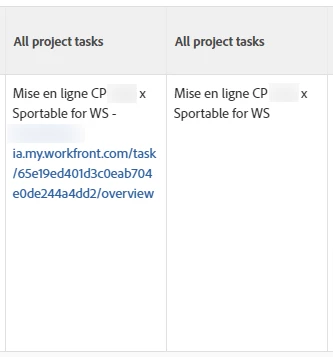


Column on the left is the current format, but the column on the right shows what I want to be the link. As below:


listdelimiter=<hr>
listmethod=nested(project).nested(tasks).lists
name=All project tasks
stretch=0
textmode=true
type=iterate
valueexpression=REPLACE({name}, {ID}, {ID})
valueformat=HTML


How do I pull the {name} through as the link?


Thanks

This post is no longer active and is closed to new replies. Need help? Start a new post to ask your question.
Best answer by skyehansen

I think the answer you're looking for might be contained in this section of this link:

https://experienceleague.adobe.com/docs/workfront/using/reporting/reports/text-mode/reference-collections-report.html?lang=en#limitations-of-a-collection-view 


The part that says "You cannot make an object in a collection a clickable link."

1 reply

skyehansen
skyehansenAccepted solution
New Participant
March 11, 2024

I think the answer you're looking for might be contained in this section of this link:

https://experienceleague.adobe.com/docs/workfront/using/reporting/reports/text-mode/reference-collections-report.html?lang=en#limitations-of-a-collection-view 


The part that says "You cannot make an object in a collection a clickable link."