New Calendar UI/UX: Ability to Expand top portion of calendar or toggle off hourly blocks of time in Weekly View | Community
Skip to main content
KierstenKollins
New Participant
April 2, 2025
New

New Calendar UI/UX: Ability to Expand top portion of calendar or toggle off hourly blocks of time in Weekly View

  • April 2, 2025
  • 25 replies
  • 2146 views

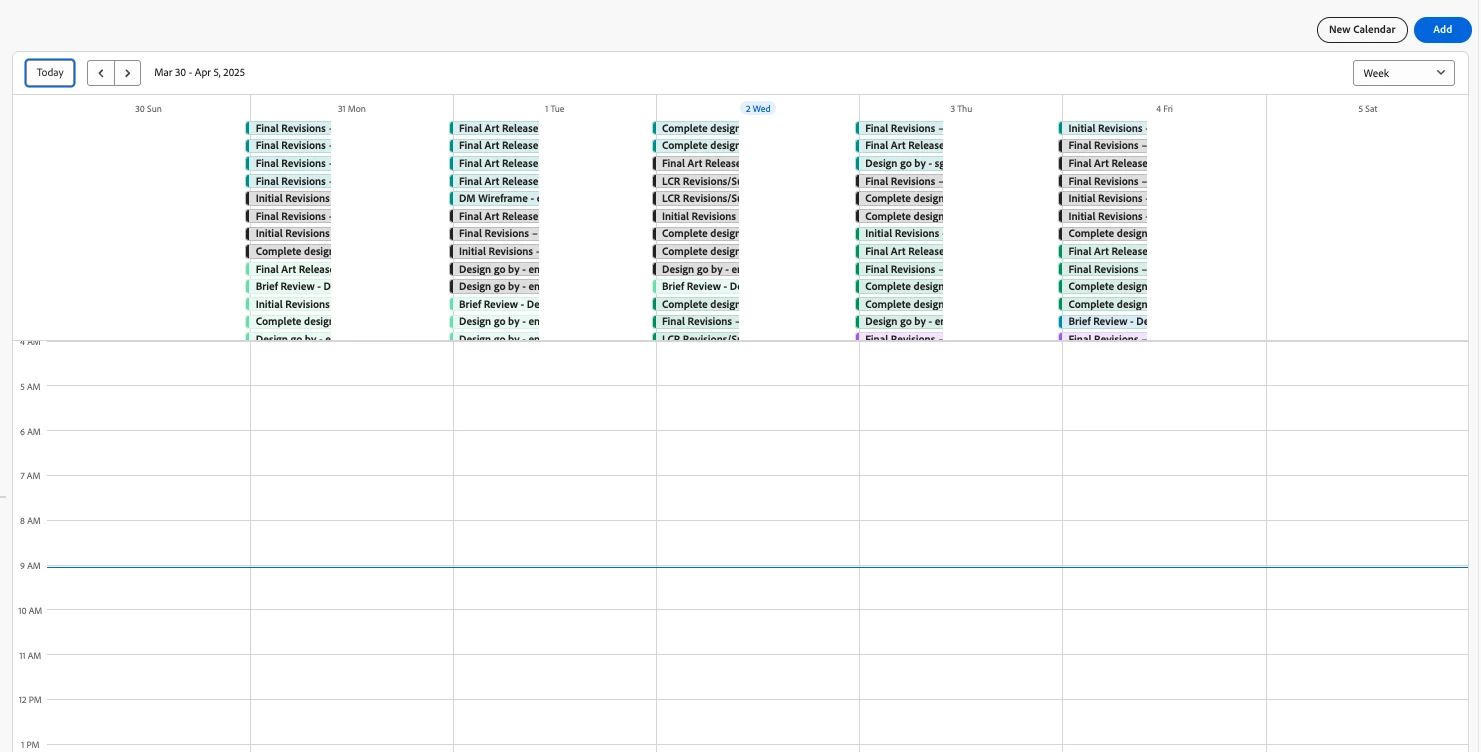
Description - Allow the option to hide the hourly breakdowns on weekly calendar view or expand the collection of calendar items in the top portion of the calendar

Why is this feature important to you - We have many tasks that pull into a calendar view and the many tasks are now all scrunched together at the top. When the list is super long, a scroll bar appears and you can scroll within the tiny area. There is not a way to hide the hourly blocks below or expand the top portion to have better visibility into the items like the current/old calendar weekly view.

How would you like the feature to work - Add a toggle button to hide the hourly blocks and/or a way to expand the top portion of the calendar to be able to see more items on the screen.

Current/Old Behavior -


New Calendar

25 replies

New Participant
May 23, 2025

Please bring back the original calendar. It was not broken. 


New Participant
May 20, 2025

I agree with the comments above. The old calendar was much better for our purposes and the new calendar has made our weekly production planning almost impossible. 

New Participant
May 19, 2025

Adding to this as well. the new UI is horrible and difficult to read. Please allow options for the previous view/layout that shows things as days instead of hours. 

New Participant
May 19, 2025

The former calendar view was much more user-friendly and better represented workload to our management team. I also liked the former function that allowed us to hide and show weekends.

brittanylang
New Participant
May 15, 2025

Hi all! I sent some feedback to our Account Support and should be having a quick call with Product soon to go over this. They did mention some of these changes were to align with Workfront Planning's calendar; however, changes for the other tool should not negatively impact how standard Workfront calendars work. I would imagine some of these needs would be good to address in that tool, also. I am taking our feedback plus all from here to discuss with them. They seem very open and helpful about this feedback, so that is great news! I am sure someone will respond here at some point, but I got impatient since this has been a big impact on the day-to-day work for many of us. 🙂 We are a creative studio within the organization, so visual components like calendars are a big help here. 

New Participant
May 6, 2025

Agree!


Many things that need to be improved on Calendars:

1) Expand the month view and week view to sow all items on that day.  It's fine if we have to vertically scroll the screen.

2) On the "week" view, allow users to remove the hours/time area on the calendar.  We don't use that type of calendar view to see that granular. We just want to know the date something is due or spanning over days.  Essentially, we just want to see the very top section of the weekly view.

3) On gantt view, allow user to go between daily, weekly, monthly, & quarterly timeframe.  We want to be able to see our whole fiscal year calendar...not just one day at a time.

4) Expand the filtering functionality

5) Allow for copying filters again within a calendar so can just make a change to the copy instead of re-entering the majority of the info again.

6) Add a yearly calendar so can see much larger timeframes

New Participant
May 5, 2025

The previous version of calendars was much more functional for our use case. Please bring the option to revert!

New Participant
April 29, 2025

Calendar - Our company used the (OLD) calendar and although they are trying to be adaptive with the new calendar, I am getting more and more support calls with the new calendar, and I never had a support call with the old calendar. The functionality in the old calendar worked. Today's state, new calendar is not helpful, and we would love to have the ability to use a ck mark for all the tasks that are completed. The analyst team, reporting team and the enterprise team would LOVE to have the functionality back and maybe in the future do a beta with the biggest user community of the CALENDAR feature. Can we get an update to these requests from the product team pls. 

New Participant
April 28, 2025

Old version better - Ruined my weekly report now. 

New Participant
April 28, 2025

We build our calendars using conditional views with rules, which is AMAZING and we love. Specific execution tasks just show up on the calendar based on how the naming convention is on the task name. I don't even know how we would be able to edit these tasks to get them to show up in the hours to make the current views more helpful. Please, please, please bring back the ability to turn off the hours section, or at least resize it so that we can make it as small as possible to maximize the space for the rest of the tasks. We also were able to view in a month using the previous functionality. Having to see only one week is less efficient.