
New Home My Tasks - Display Time When Task is Due to Start and End | Community
Skip to main content
KierstenKollins
New Participant
March 20, 2024
New

New Home My Tasks - Display Time When Task is Due to Start and End

  • March 20, 2024
  • 15 replies
  • 2118 views

Description - In My Tasks, the tasks do not display the timestamp when a task is due to start and end.

Why is this feature important to you - Our teams work by the hour and have tasks that are due throughout the day. Rarely, we have tasks that last the full business day. My concern is that users will not use the Home and will rely on reports with this not being visible to them as it is not clear what tasks need to be completed first for the day.

How would you like the feature to work - Add the start and end date timestamps to be visible.

Current Behaviour - Does not exist
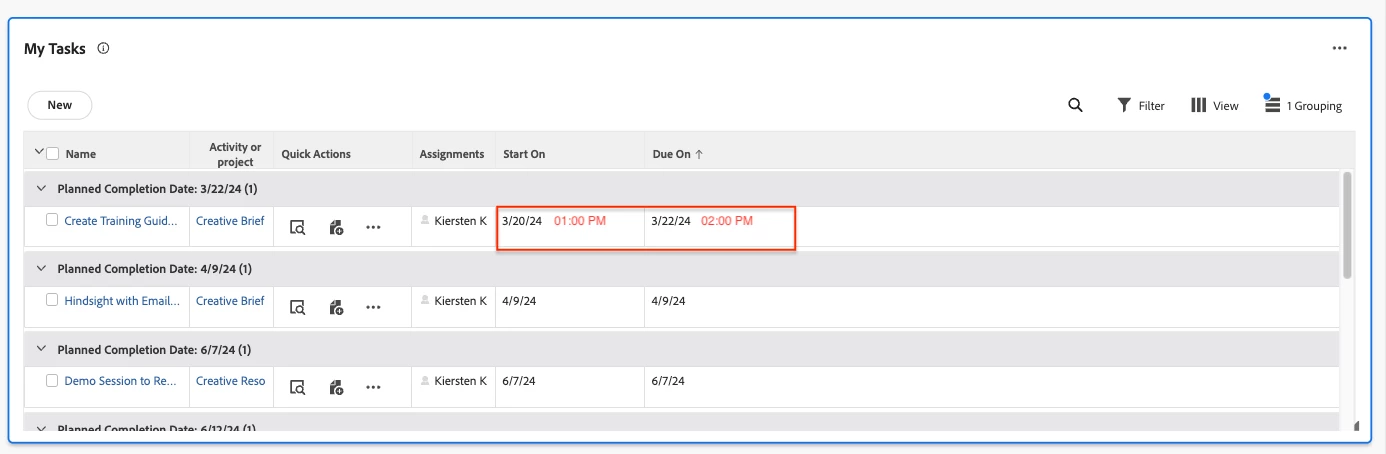


Including the Priorities idea here as well as these are related: https://experienceleaguecommunities.adobe.com/t5/workfront-ideas/priorities-display-time-when-task-is-due-to-start-and-end/idi-p/708345


15 replies

KierstenKollins
New Participant
October 29, 2024

@skyehansen - You're a genius. I had no idea that you could do that to convert the hours to be user friendly. I will be adding this to my list to revisit. Thanks as always for your insights!


skyehansen
New Participant
October 29, 2024

@brandonnw  (and possibly @kierstenkollins  ??) I just want to clarify that I only gave out that previous calculation as an example and a starting point. Please don't take any calculation I have posted as your solution. This particular one is not something you would choose to use as-is, for the specific reasons you mentioned. Here is another sample to show you what can be accomplished:


CONCAT(CASE(HOUR({plannedCompletionDate}),"1","2","3","4","5","6","7","8","9","10","11","12","1","2","3","4","5","6","7","8","9","10","11","12"),":",MINUTE({plannedCompletionDate}))
 
As you can see, you can use the "case" function to replace any occurrence of "more than 12" with the routine 12h time instead of 24h time. You can similarly use this for replacing the minutes up to 60 -- which since I don't want to type numbers from 1 to 60, I will leave as an exercise for someone else. Similarly, you can put into your calculation that if the hours are more than 11, to put in a "PM" and if they are less than 11, to put in an "AM". I'll leave that as an exercise for someone else as well.
 
These suggestions are potentially a great thing to test AI on, for those who are training chatGPT or workfront AI to do their bidding! 
KierstenKollins
New Participant
October 29, 2024

@brandonnw - Agreed. I explored that option and showed the set up to a few members. They were not impressed so we did not pursue it.

BrandonNW
New Participant
October 29, 2024

Yep! Count Nationwide in as well for another company that really depends on timestamp for creatives. I can confirm that Skye's suggestion doesn't quite get it done either as it displays the hour in n24 hour clock format. It still could work, but not ideal.
Calculation result:  19:0

New Participant
August 20, 2024

Our team had submitted feedback on this multiple times earlier this year regarding the need for timestamps.  With the sunsetting of the legacy home screen in October there is renewed interest, specifically from our creative department, to address this issue.  Please keep us updated on if this enhancement is possible.

jerflo
Employee
August 1, 2024

Hi @melissan1 - Thank you for your feedback. I was referring to our product usage data. Currently, there is no way to expose the timestamp on the widgets. However, feedback like this helps us understand its importance for future improvements. While I can't provide a specific timeline, I will keep you all updated on any progress we make here. 


skyehansen
New Participant
July 31, 2024

@kierstenkollins -- I'll keep my fingers crossed for you. We fought pretty hard to have the ability to have custom fields show up in Home and are currently fighting the good fight to have longer content that line-wraps. The more general use this functionality sees, the louder our voice, and the more improvements we can gain that benefit everyone.

KierstenKollins
New Participant
July 31, 2024

@skyehansen - That's a good idea. I will need to look into this possible idea this week. Thank you as always!

skyehansen
New Participant
July 31, 2024

has anyone tried creating a calculated field showing the hour and minute of the date in question, e.g. CONCAT(HOUR({plannedCompletionDate}),":",MINUTE({plannedCompletionDate})) and exposing this field as one of the available columns in a view on one of the widgets? If it works, it could be a good workaround to use until Workfront catches up to the problem.


https://experienceleague.adobe.com/en/docs/workfront/using/product-announcements/product-releases/release-24-q2/24-q2-home-enhancements -- Workfront allowed column customizations in Home in Q2.

New Participant
July 29, 2024

Hi @jerflo - thanks for the response! Curious as to what data you're referring to as it relates to exposing the time? My team did not switch to the new home last year when it was launched specifically because the task due times were not showing on their home page and I could not find a way to expose them. Is there a way to do that without having it be standard for everyone? Legacy home showed task due times automatically, and I didn't think that those were able to be hidden so I'm confused as to where the data is coming from. Thanks again!