Notification Box In Workfront (Not Email Notification) | Community
Skip to main content
MegSVT
New Participant
July 2, 2024
Solved

Notification Box In Workfront (Not Email Notification)

  • July 2, 2024
  • 3 replies
  • 1537 views

Is there a way to customize event notifications that occur within Workfront? 


Several of my users are not using the small blue notification box as it produces too many notifications (like tasks assigned to them). They are relying on @Mentions but not seeing every notification when a task or approval is ready for them. 

This post is no longer active and is closed to new replies. Need help? Start a new post to ask your question.
Best answer by KellieGardner

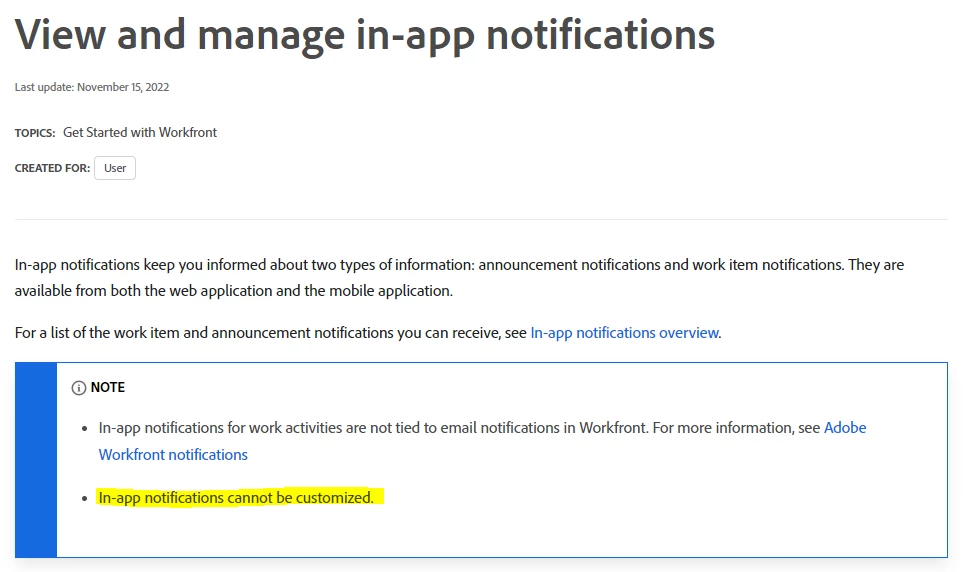
@megsvt - confirming what Randy said that in-app notifications are not customizable  which also means that can't be turned on or off. There are a few ideas summitted you can upvote around it.


https://experienceleague.adobe.com/en/docs/workfront/using/basics/use-notifications/view-and-manage-in-app-notifications

3 replies

KellieGardner
KellieGardnerAccepted solution
New Participant
July 3, 2024

@megsvt - confirming what Randy said that in-app notifications are not customizable  which also means that can't be turned on or off. There are a few ideas summitted you can upvote around it.


https://experienceleague.adobe.com/en/docs/workfront/using/basics/use-notifications/view-and-manage-in-app-notifications

RandyRoberts
New Participant
July 2, 2024

The Notifications area is only for emails. AFIK, there are no controls for in-app notifications.

As you can see in the attached screenshots, I have all notifications turned off but when assigned 3 tasks and an issue, I still get in-app notifications.

Richard__Carlson
New Participant
July 2, 2024

You are totally right!  My understanding all these years was wrong but to be fair I feel that this is not well explained in the Workfront docs or system admin interface!  😛

To answer the question in the OP I would say it would be a matter of each individual user clearing out their accumulated announcements and notifications and then when one pops up it will be more evident and valuable.  It's not a matter of them not getting them, it's that "they can't find them."

RandyRoberts
New Participant
July 2, 2024

Agreed, I keep mine cleared out and I just get a few per day, maybe a dozen or so. But if you have 5,000+ unread messages, you're not finding anything... ever. I've seen notfication boxes with 5,000+ messages quite a few times.


That all being said, it would be nice to have more controls over in-app notifications.


Richard__Carlson
New Participant
July 2, 2024

If you go into the individual's user preferences there is a section for notifications - both instant and daily summary

MegSVT
MegSVTAuthor
New Participant
July 2, 2024

Yes - I understand the user can update their email notifications.


What I am looking for is not an email notification. As noted above, I am looking to turn off certain event notifications that show up in a user's small blue notification box within Workfront. 

Richard__Carlson
New Participant
July 2, 2024

To the best of my understanding, the functionality is you enable notifications within Workfront and as a byproduct you can choose receive email notifications.  The notification section is not expressly about emails.  This is where you choose, on a granular level, the notification preferences - the items that appear in the blue box.


See screenshot