NWE: On the Request Level - Sharing a document. I only see the "Sharing" link under the ellipsis appearing next to the document name, on the document detail page. I do not see it in the document details summary tab. | Community
Skip to main content
Level 2
Nov 25, 2020 9:59 PM UTC
Solved

NWE: On the Request Level - Sharing a document. I only see the "Sharing" link under the ellipsis appearing next to the document name, on the document detail page. I do not see it in the document details summary tab.

Is this the only way to access "Sharing" on the document level? It seems quite hidden.

This post is no longer active and is closed to new replies. Need help? Start a new post to ask your question.
imgrund
imgrundAccepted solution
Employee
Nov 30, 2020 2:42 PM UTC

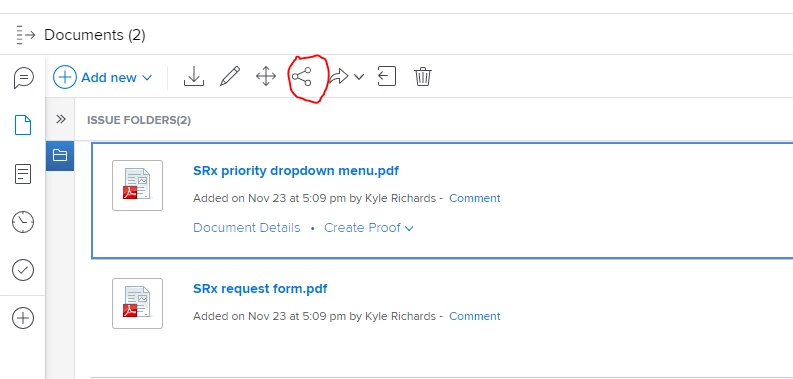
Hi Jeanette - the Share button isn't in the document summary panel, but when you click on the tile to get info on the summary panel, there is an icon on the top tool bar that you can click to share.

4 replies

Level 2
Nov 30, 2020 4:57 PM UTC

Hi Kyna,

Thanks for the suggestion. I just submitted this as feedback.

Translate
Level 2
Nov 30, 2020 2:49 PM UTC

Thanks Anthony. My early adopters find that "sharing" seems hidden in the new experience.

Translate
kynabaker16
Employee
Nov 30, 2020 4:27 PM UTC

Hi Jeanette,

Thank you for posting this! I know that our product team is actively watching for feedback about the new Workfront experience so if you give feedback in the product (Help> Give Feedback) or in the Innovation Lab (if you are an Authorized Support Contact), it will be reviewed quickly!

Thanks,

Kyna

Translate
imgrund
imgrundAccepted solution
Employee
Nov 30, 2020 2:42 PM UTC

Hi Jeanette - the Share button isn't in the document summary panel, but when you click on the tile to get info on the summary panel, there is an icon on the top tool bar that you can click to share.

Translate