Planned Hour Distribution | Community
Skip to main content
New Participant
May 2, 2023
Solved

Planned Hour Distribution

  • May 2, 2023
  • 3 replies
  • 951 views

Hi everyone, I'm currently working on project templates and I'm struggling with the way WF distributes planned hours evenly across the task duration. Is there a way to stop this from occurring and instead fill an assignees working day with as much of a task's planned hours as possible?  For example, standard working day is 7 hours, a task has 8 planned hours and a duration of 2 days. At the moment WF splits the task over 2 days, 4 hours in each of the two days rather than 7 hours in day 1 and 1 hour in day 2. 

Best answer by Kundanism

Hi @marktwo 

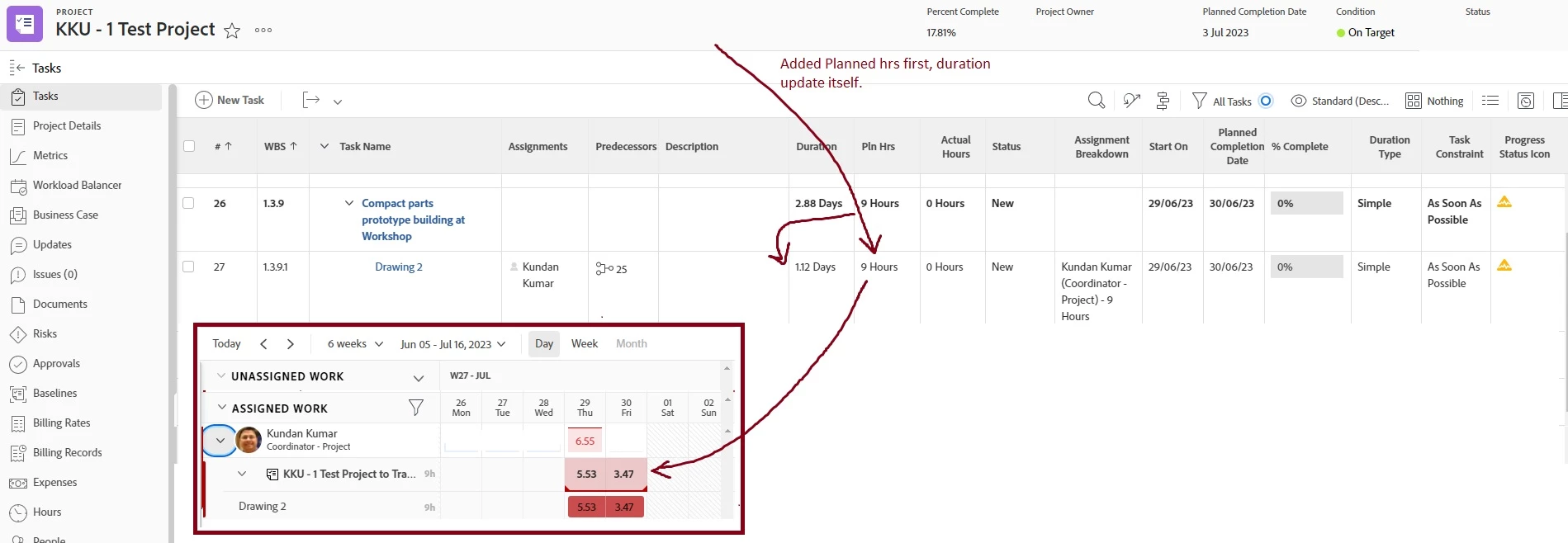
As per understanding, if the user is connected to a proper schedule which says the number of hours each day + Work time & FTE also required to update (which varies from 0.1 to 1). You will get the more correct distribution. Also, check with Task Constraint and Task Typer such as "Simple".

Sharing an example for reference.

3 replies

Kundanism
KundanismAccepted solution
New Participant
May 3, 2023

Hi @marktwo 

As per understanding, if the user is connected to a proper schedule which says the number of hours each day + Work time & FTE also required to update (which varies from 0.1 to 1). You will get the more correct distribution. Also, check with Task Constraint and Task Typer such as "Simple".

Sharing an example for reference.

markTwoAuthor
New Participant
May 3, 2023

Thanks for the information @doug_den_hoed__atappstore much appreciated.  

Doug_Den_Hoed__AtAppStore
New Participant
May 2, 2023


Hi @marktwo,


As you've observed, Workfront's As Designed behavior is to distribute planned hours evenly (aka "peanut butter spread") across the task duration, and although you can individually "shape" tasks afterwards manually, there is no automated way to do so.


In an earlier release of our Resource Grid solution, we did allow users to right click a task and select among "Remove Contour", "Front Load", or "Back Load" to then automatically distribute the work accordingly. And -- as you might know -- given Workfront's again As Designed behavior to "reset" such distributed work (back to peanut butter spread) whenever something material changed (such as the Start Date, Duration, Planned Hours, etc.), we also had an additional option to "Copy Contour" so users could make one or more such material changes, and then "Paste Contour" to get back to the desired shape again without having to manually re-enter all of the hour-per-assignee-per-day details again. About two years ago, though, in consultation with the Workfront Dev team who advised us that the underlying data structures were changing (and now have), we disabled all of these features, which -- candidly -- were too complex for all but the most advanced Workfront customers.


That said...Been There, Done That, so for you or anyone else who's interested in chatting further, you're welcome to email me at doug.denhoed@atappstore.com


Regards,

Doug