
Planned Hours column formatting
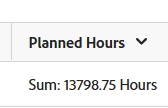
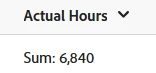
Below is the current text mode for the Planned Hours column in my project report and how it is showing when I run the report. Is there a way I can update the code to have it show 13,798.75 (which adds a comma and removes the word 'Hours')?? The Actual Hours column shows the format I want without changing the code (added this image below as well) but I can't seem to figure out the code to get the Planned Hours to show the format I want.
aggregator.displayformat=minutesAsHoursString
aggregator.function=SUM
aggregator.namekey=workrequired
aggregator.valuefield=workRequired
aggregator.valueformat=intAsInt
linkedname=direct
namekey=workRequired
querysort=workRequired
valuefield=workRequired
valueformat=compound
viewalias=workrequired
Thanks in advance!!