Populating plain language task status on a project report: help! | Community
Skip to main content
New Participant
June 27, 2024
Question

Populating plain language task status on a project report: help!

  • June 27, 2024
  • 2 replies
  • 488 views

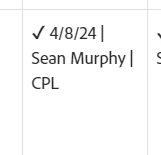
I have used the code from the community to build a project-level report that shows individual tasks in columns going left to right. The basic view is below. I have the column filter on a task name, with the idea being we show a check mark if complete, along with planned completion date and assignee. The latest ask from the business is to show exact task status "New, In Progress," "Complete," etc. However, in textmode when using the {status} field, I only get the key. Down below, you can see the CPL versus complete.


Is there an existing field that shows that plain language status that i can source, or will this be an insanely nested IF statement to get what they want?


Thanks in advance!


This post is no longer active and is closed to new replies. Need help? Start a new post to ask your question.

2 replies

Doug_Den_Hoed__AtAppStore
New Participant
June 27, 2024


Hi @Ryan_McGee,


Ehm...yes (to spare you)...


Using a Project report in this manner is likely insane, in my opinion. To achieve a similar grid output, I'd instead suggest a Task report in matrix mode with one row per project, one column per task, and the information as you've proposed as the cell values (using text mode).


Regards,

Doug

New Participant
June 27, 2024

I found the relevant thread in past questions. Basically the code I used was this


IF(CONTAINS("INP",{status}),"In Progress",


and repeated until I had done all the statuses.