Proof Options Not Showing for User | Community
Skip to main content
New Participant
July 12, 2024
Solved

Proof Options Not Showing for User

  • July 12, 2024
  • 2 replies
  • 1293 views

Any idea why a user might not see the Proofing options after uploading a files to their Documents section of Workfront? I have attached a screenshot of what they should see but I have one particular user that does not see those option appear. I am thinking it is an access/permissions issue. Thanks so much!

This post is no longer active and is closed to new replies. Need help? Start a new post to ask your question.
Best answer by Madalyn_Destafney

Hi there, based on your screenshot of what the user sees, it doesn't look like this is a proof, it's just a document/file that was uploaded. When uploading a proof, you'd select Add new > Proof, instead of Add new > Document. 

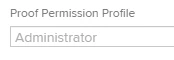
If you're confident it's a proof, then just check the user is actually included on the proof as a reviewer/reviewer & approver, etc. (whatever is appropriate) and has a proof license in their profile:


2 replies

Madalyn_Destafney
Madalyn_DestafneyAccepted solution
New Participant
July 12, 2024

Hi there, based on your screenshot of what the user sees, it doesn't look like this is a proof, it's just a document/file that was uploaded. When uploading a proof, you'd select Add new > Proof, instead of Add new > Document. 

If you're confident it's a proof, then just check the user is actually included on the proof as a reviewer/reviewer & approver, etc. (whatever is appropriate) and has a proof license in their profile:


If this helped you, please mark correct to help others : )
mwigo34Author
New Participant
July 12, 2024

Thank you very much. I appreciate the quick responses. 

KellieGardner
New Participant
July 12, 2024

Can you post a photo of what they are seeing?

mwigo34Author
New Participant
July 12, 2024

Sure. See attached.