Removing "Sum:" from report summary | Community
Skip to main content
New Participant
February 26, 2020
New

Removing "Sum:" from report summary

  • February 26, 2020
  • 2 replies
  • 588 views

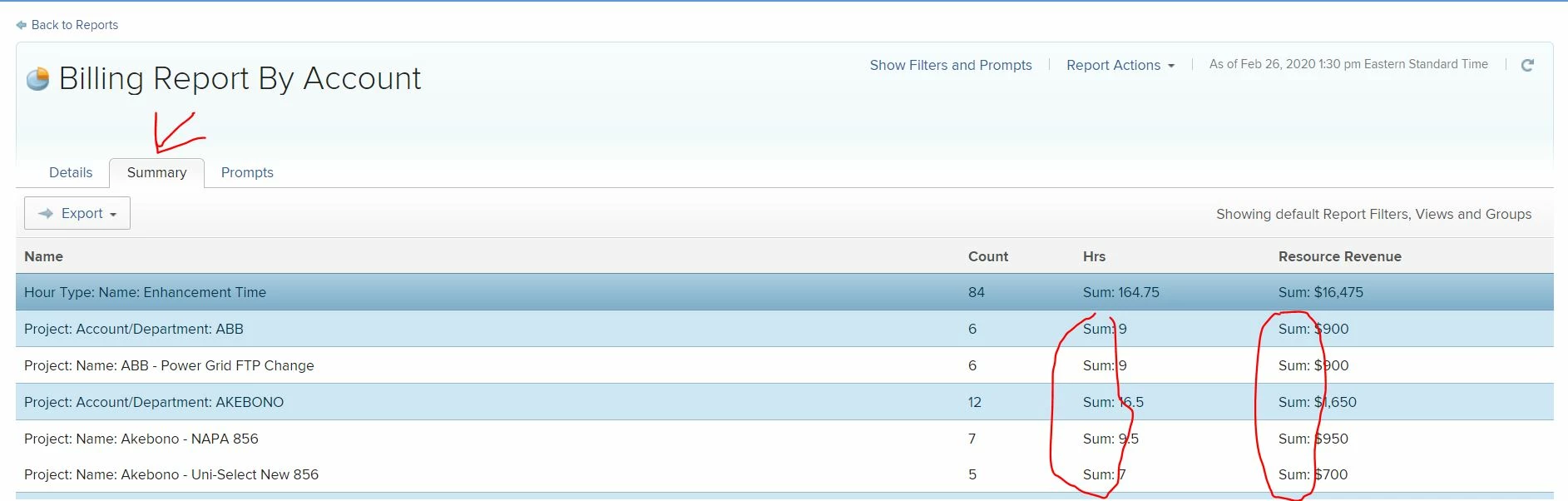
We send a an hours report to our billing department. The data we send is the summary tab that is grouped by hour type, account and project. The issue with this report is that the summary version of the report puts an unnecessary "Sum:", "Count:", "average:" etc before the actual value.


Can the description of the value be headed as either a column heading or another column next to it?


The unnecessary descriptor exports to excel in the same cell requiring in the accounting team to manipulate the data so that they can get the actual value.

2 replies

New Participant
October 10, 2024

I believe there is an option now to change the report to matrix (within Edit > Grouping), and then with that page on the top right is 'matrix settings', where you can remove Count and Value columns. I am wondering if it will allow you to remove your Sum column that way?

New Participant
February 26, 2020

Correction to my grammar: Can the description of the value be added headed as either a column heading or another column next to it?