Request Queue- New Request- Details Section | Community
Skip to main content
New Participant
November 3, 2022
Solved

Request Queue- New Request- Details Section

  • November 3, 2022
  • 2 replies
  • 1015 views

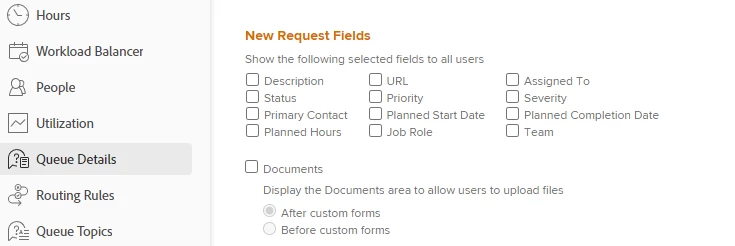
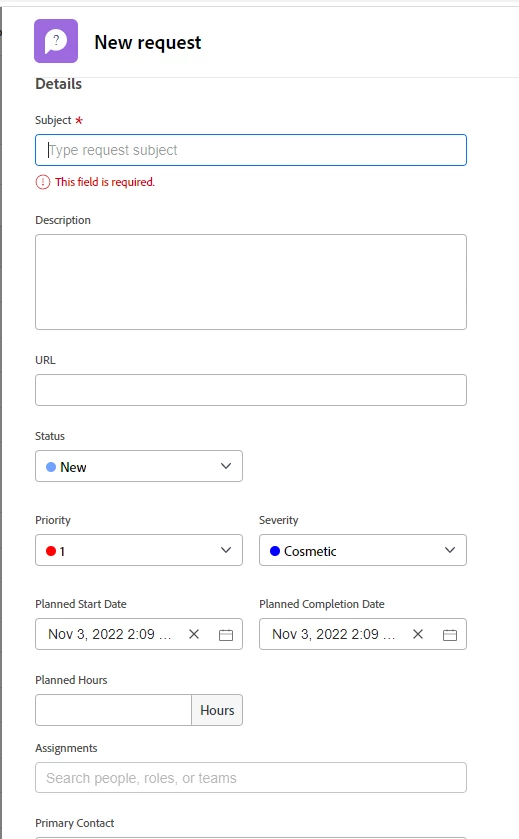
I'd like to find out how to get rid of the details section other than "Section" on the area above my custom forms in new requests. 
 

This post is no longer active and is closed to new replies. Need help? Start a new post to ask your question.
Best answer by Rafal_Bainie

But "details" is what you include in your request, so what exactly is the intention:

1. to get rid of default fields and use custom ones?

2. to get blank request with subject line alone?


For 1. unselect everything in queue details and attach custom form(s) with required fields


For 2. just unselect everything.


There is much more to say around this (routing rules, queue topics etc.), but that depends on what you are trying to achieve

2 replies

Rafal_Bainie
Rafal_BainieAccepted solution
New Participant
November 8, 2022

But "details" is what you include in your request, so what exactly is the intention:

1. to get rid of default fields and use custom ones?

2. to get blank request with subject line alone?


For 1. unselect everything in queue details and attach custom form(s) with required fields


For 2. just unselect everything.


There is much more to say around this (routing rules, queue topics etc.), but that depends on what you are trying to achieve

New Participant
June 26, 2024

Don't think unselecting everything will help get rid of the "Subject" field as well as the word "Details"

Any idea how to achieve that if it's ever possible?

Rafal_Bainie
New Participant
June 26, 2024

I don't think you will get rid of subject, what would be left without it in the form? 🙂 

Word "details" is just there, I didn't pay attention to this before, but indeed seems pretty pointless. At the same time I don't think this can be removed either

ChloeWY
New Participant
November 4, 2022

Hi @elizabethhackett , this is probably a custom form attached to your request queue.  If you go to the request queue and go to Queue Details, it will show you what custom forms are attached so you know what they're called and can edit them.