Sort by two fields in a project report | Community
Skip to main content
New Participant
July 16, 2024
Solved

Sort by two fields in a project report

  • July 16, 2024
  • 1 reply
  • 523 views

Right now my project report is "custom sorted" by Project Status using a calculated field in a custom form so that current projects show on the top and complete projects show on the bottom. To do so, I used a calculated field in a custom form to number the statuses (the formula looks like this IF({status}="INI","1",IF({status}="APR","2",IF({status}="PLN","3",IF({status}="CUR","4",IF({status}="EXE","4",IF({status}="PKX","5",IF({status}="JPW","6"))))))). I then added a column for the calculated field to the report and followed the steps from this article to hide that column.


On top of the project status sorting, though... I would also like to make it so that of the current projects, they show in order of their planned completion date.


Anyone know of a way to achieve this? 

This post is no longer active and is closed to new replies. Need help? Start a new post to ask your question.
Best answer by KellieGardner

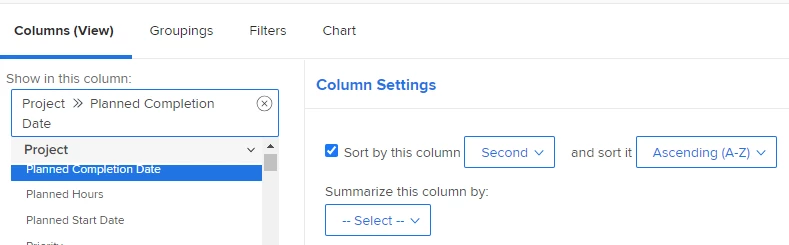
If you have a column for planned completion date on your report you should be able to sort through the native functionality.


However, if you want to sort by planned completion date without having it as a column (like you did with the above scenario) you should be able to add this to to another column to sort it by completion date without displaying it.


querysort=plannedCompletionDate
sortOrder=2
sortType=asc

1 reply

KellieGardner
KellieGardnerAccepted solution
New Participant
July 17, 2024

If you have a column for planned completion date on your report you should be able to sort through the native functionality.


However, if you want to sort by planned completion date without having it as a column (like you did with the above scenario) you should be able to add this to to another column to sort it by completion date without displaying it.


querysort=plannedCompletionDate
sortOrder=2
sortType=asc

AudraScAuthor
New Participant
July 17, 2024

Thank you, Kellie. This did work by sorting the planned completion date second from the standard project editing.