Task Report - Tasks Ready to Start | Community
Skip to main content
DeborahLeigh123
New Participant
March 20, 2024
Solved

Task Report - Tasks Ready to Start

  • March 20, 2024
  • 2 replies
  • 771 views


Greetings!


I'm looking to include in my report the following:

  1. Tasks assigned to $$USER.ID
  2. Predecessor Is Complete - True
  3. Project Status - In Progress
  4. Task Percent Complete - Not Equal to 100%
  5. Task is Not equal to Complete, Canceled or On Hold
  6. Tasks with no predecessors - How do I include this one in my report? I'm not figuring this one out. 

Thank You, Deb

This post is no longer active and is closed to new replies. Need help? Start a new post to ask your question.
Best answer by KellieGardner

Hi Deb -


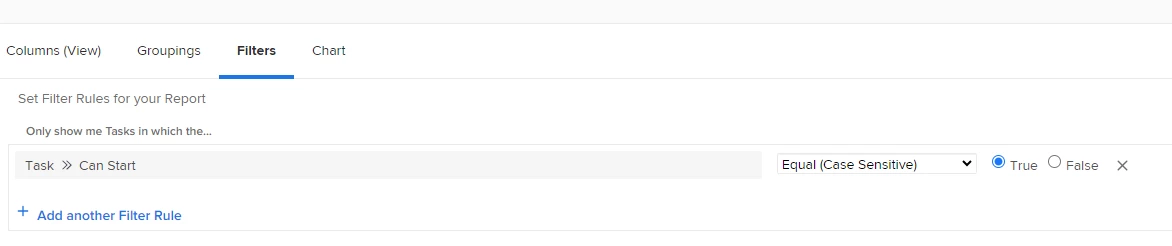
You'll want to use the filter "can start" = True. This will pull in anything that is ready to start - meaning it has predecessors complete or does not have an dependencies.


2 replies

KellieGardner
KellieGardnerAccepted solution
New Participant
March 20, 2024

Hi Deb -


You'll want to use the filter "can start" = True. This will pull in anything that is ready to start - meaning it has predecessors complete or does not have an dependencies.


DeborahLeigh123
New Participant
March 20, 2024

Perfect. Many thanks!

Richard__Carlson
New Participant
March 20, 2024

In order to make things consistent and simple we have our users utilizing the new home and specifically the My Tasks widget, I am just curious if you have tried using this tool and how it might have potentially fallen short of your needs.