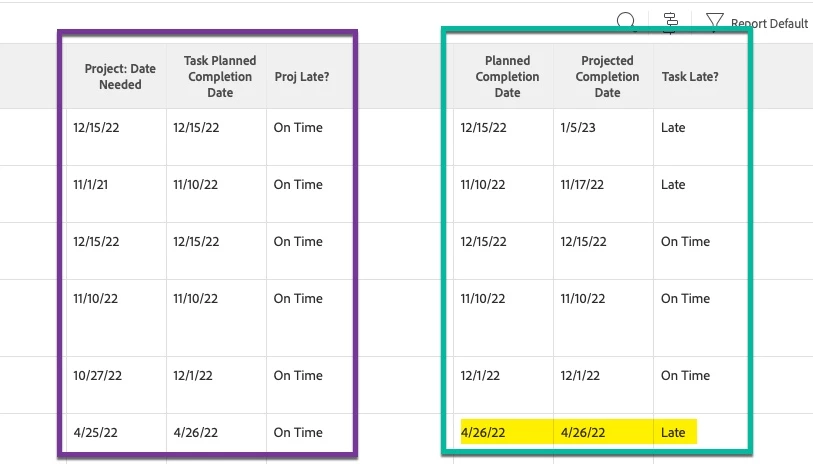
Text Mode Report: IF Statement in column, to catch us not meeting promised dates
I am working with a task report, and attempting to add a column using text mode to show if the task is on time or late, based on "Date Needed." This s a date entered into a field on the project custom form.
I’ve struggled to get it to work, so I backed off to get a more straight forward valueexpression to work.
This “Task Late?” column works
displayname=Task Late?
linkedname=direct
namekey=plannedStartDate
querysort=plannedStartDate
textmode=true
valueexpression=IF({plannedCompletionDate}<{projectedCompletionDate},"Late","On Time")
valueformat=HTML
Note: The caveat to the above is that it seems to show Late or On Time correctly for the most part, but there are a few that show “late” even though the dates are the same. I think it might be considering the time. How can I tell it to ignore the time, and only consider the date?
What I really want to use though, is the Date Needed field from a custom form, compared to the task planned completion date.
This is what I’ve tried, but every item is displaying On Time.
displayname=Proj Late?
linkedname=project
namekey=view.relatedcolumn
namekeyargkey.0=project
namekeyargkey.1=Date Needed
querysort=DE:project:Date Needed
textmode=true
valueexpression=IF({DE:project:Date Needed}<{plannedCompletionDate},"Late","On Time")
valueformat=HTML
Ideally, I’d like to Filter the entire report to only show the projects where the Date Needed (project) is less than the task planned completion date – so it would show me the projects that are currently running behind the date it is needed. I don’t think that’s possible, though?