
Trying to add the highlighted child tasks into a report, but not sure how to do that. | Community
Skip to main content
Tracy_LG
New Participant
July 24, 2024
Solved

Trying to add the highlighted child tasks into a report, but not sure how to do that.

  • July 24, 2024
  • 1 reply
  • 589 views

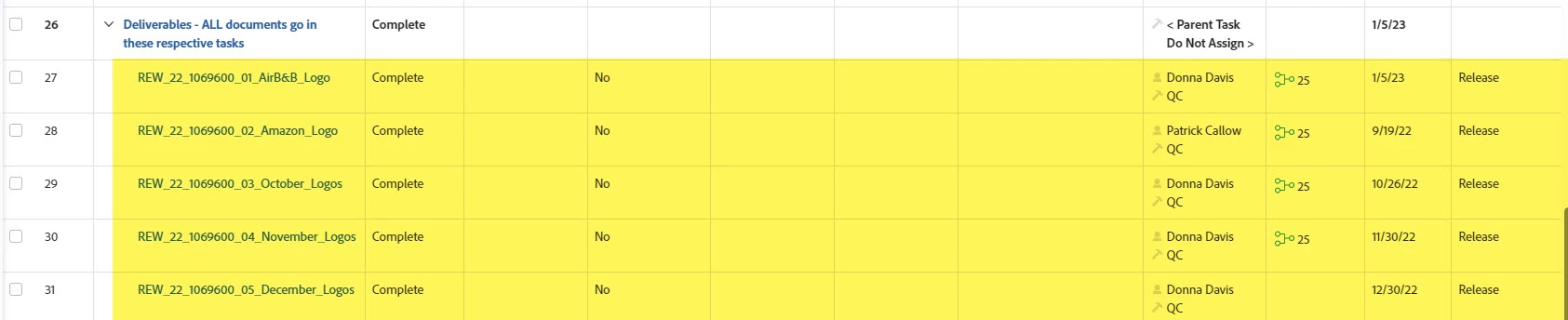
I need to add the yellow highlighted tasks into a report.  I have tons of projects using 7 different templates; however, I only want to pull in child tasks that fall under the parent name "Deliverables - All documents go in these respective tasks."  All 7 templates use this parent task, but the child task names change depending upon the project.  


I can't figure out how to do this....
 

This post is no longer active and is closed to new replies. Need help? Start a new post to ask your question.
Best answer by KristenS_WF

I'm assuming this is a task report?  You could try adding two entries to your filter:

  • Task >> Number of Children Equals 0 [this would exclude any parent tasks]
  • Parent >> Name Contains "Deliverables - All documents go in these respective tasks"

I find using names a little fiddly (sometimes I forgot I have objects with the same names), so you could also change the last one to:

  • Parent >> Template Task ID Equal [enter the template task IDs of the tasks in your 7 templates]


1 reply

KristenS_WF
KristenS_WFAccepted solution
New Participant
July 24, 2024

I'm assuming this is a task report?  You could try adding two entries to your filter:

  • Task >> Number of Children Equals 0 [this would exclude any parent tasks]
  • Parent >> Name Contains "Deliverables - All documents go in these respective tasks"

I find using names a little fiddly (sometimes I forgot I have objects with the same names), so you could also change the last one to:

  • Parent >> Template Task ID Equal [enter the template task IDs of the tasks in your 7 templates]


Tracy_LG
Tracy_LGAuthor
New Participant
July 24, 2024

Holy crap!  That worked.  Thank you so much!!!!!!!!!!!!!!!!!!!!!!!!!!!!!