What is the purpose and functionality of the highlighted options in the Issues object | Community
Skip to main content
New Participant
April 17, 2024
Solved

What is the purpose and functionality of the highlighted options in the Issues object

  • April 17, 2024
  • 1 reply
  • 687 views

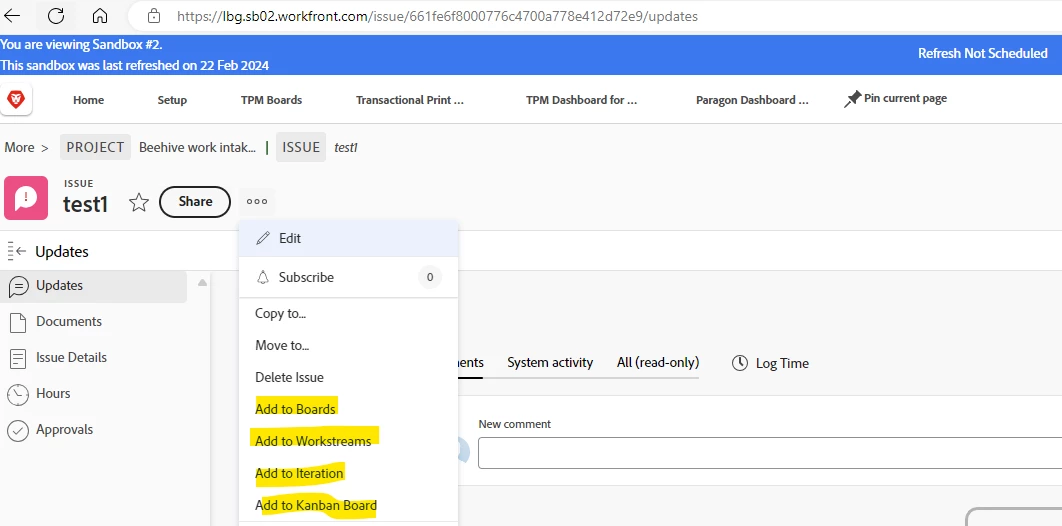
Can someone help with understanding these highlighted options in the screenshot on what they mean and their functionality? I understand what Boards is but why is there 2 boards option? One for Boards and other is Kanban boards.  Also what is add to workstreams and add to iteration mean. This is a screenshot of an issue and when we click on the 3 dots to convert it.

 

This post is no longer active and is closed to new replies. Need help? Start a new post to ask your question.
Best answer by Rafal_Bainie

This should be a good starting point: https://experienceleague.adobe.com/en/docs/workfront/using/agile/agile-overview

Make sure to click "view more" in the menu on LHS and browse through all of the content

1 reply

KellieGardner
New Participant
April 17, 2024

They are the different types of agile options available in Workfront. 


anasooyaAuthor
New Participant
April 17, 2024

thanks for your response. Is there any documentation that you can share and point me to understand more on these options? especially iteration and workstream


Rafal_Bainie
Rafal_BainieAccepted solution
New Participant
April 18, 2024

This should be a good starting point: https://experienceleague.adobe.com/en/docs/workfront/using/agile/agile-overview

Make sure to click "view more" in the menu on LHS and browse through all of the content