
Why do I have to click SHOW to see the boards that a task or issue is on? | Community
Skip to main content
RandyRoberts
New Participant
April 12, 2023
New

Why do I have to click SHOW to see the boards that a task or issue is on?

  • April 12, 2023
  • 4 replies
  • 696 views

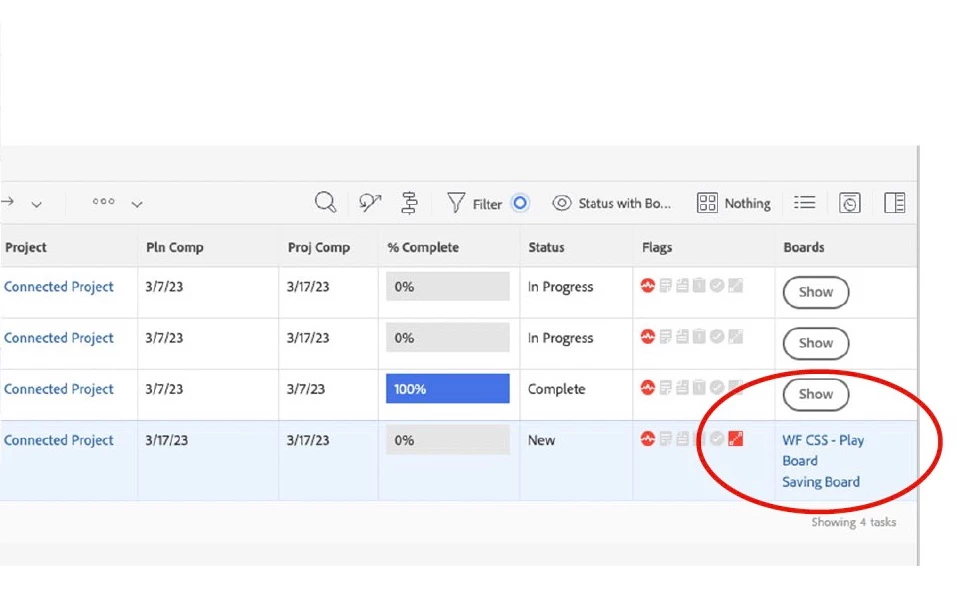
Description - The new "Boards" column in reporting displays a "Show" button that must be clicked to show the data. Why I gotta click Show? Seriously, if a have a list of 200 tasks, why do I have to click "Show" 200 times? I'm curious about the thought process regarding this "feature".

Why is this feature important to you - I don't want to have to click show over and over to find what I'm looking for.

How would you like the feature to work? - Just show the data!!

Current Behaviour - User must click "Show" to see the data.
4 replies

New Participant
December 1, 2023

Agree.  This SHOW button is not helpful.  I need to quickly see in my project plan or a report if the task or issue is already on a board because we don't automatically move all tasks onto certain boards.

New Participant
September 29, 2023

Agreed!  When adding requests to boards it would  be ideal to see which requests have been added vs. not added would be helpful.  Not very helpful if you have to click each one to see if it has been added or not.

RandyRoberts
New Participant
April 13, 2023

I think if the object isn't on a board, it doesn't show anything and the "Show" button disappears. This "feature" was not very well thought out.

New Participant
April 13, 2023

I am not sure if it is just my environment but when clicking on SHOW the button disappears and "shows" nothing...In a column, board or new tab???