How to capture the current date/time into a eVar | Community
Skip to main content
New Participant
July 14, 2017
Solved

How to capture the current date/time into a eVar

  • July 14, 2017
  • 14 replies
  • 11860 views

Hello All,

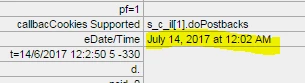
I want to capture and save the current date into a eVar which can be used for reporting and analysis purpose later. I can see that date/time into Adobe debugger. Could anybody please help me to capture the same into a eVar.

Also this timestamp is showing in different time zone even though I have selected my current time zone in report suite settings. Please guide me if this can also be changed to proper timezone.
Regards,

Manish

This post is no longer active and is closed to new replies. Need help? Start a new post to ask your question.
Best answer by EricMatisoff

Here's a great start for you: DTM Examples

It will give you all the details on 'setting a global s object' which DTM does not do out of the box. You can then follow my instructions here for creating the doPlugins area:

https://www.searchdiscovery.com/blog/adobe-dtm-update-let-adobe-manage-measurement-library/

You'll want to set up time parting in doPlugins.

14 replies

New Participant
July 23, 2024

I'd be glad to help you capture the current date/time into an eVar in Adobe Analytics. Here's a response combining the best aspects of previous suggestions and addressing potential time zone concerns:

Capturing Current Date/Time into an eVar:

  1. JavaScript Code:

    JavaScript
    s.eVarX = new Date().toISOString(); // Capture current date/time in ISO 8601 format (YYYY-MM-DDTHH:mm:ss.sssZ)
    
    Use code with caution.
     
    • Replace X with the actual eVar number you want to use (e.g., s.eVar1).
    • This code snippet captures the current date and time using new Date() and converts it to ISO 8601 format using toISOString() for consistent data handling and reporting. check here
  2. Implementation:

    • Integrate this code into your web pages where you want to capture the timestamp.
    • Common options include:
      • Directly placing the code within your HTML files within a <script> tag.
      • Using a tag management system (TMS) like Adobe Launch to manage and deploy the code across your pages for pixel growth.
New Participant
June 18, 2018

EDIT to my last Comment :

Sorry, I meant DATA ELEMENT and not CONTEXT DATA !

EricMatisoff
Employee
June 18, 2018

I'd highly recommend creating a global s object:

DTM Examples

New Participant
June 18, 2018

Hello Adobe Community !


Hello ericmatisoff


I don't want to be negative about this, but I tried to follow the tutorial on your document, and it's very well documented,

But even this did not work. I believe there is a problem on the order of loading in the JS objects. The main issue was that the s object was "Unspecified" - and I believe that this was only true when the DTM was calling for this object - since I could use it on the console once every thing was loaded.

But it's ok , I implemented a new context data that manages to give the Date without using the s object as in :

s.getTimeParting = ....

so what id did in my Context data is this :

function addZero(i) {

    if (i < 10) {

        i = "0" + i;

    }

    return i;

}

function myTimePlugin() {

    var d = new Date();

    var h = addZero(d.getHours());

    var m = addZero(d.getMinutes());

    var s = addZero(d.getSeconds());

    var d = addZero(d.getDay());

    switch(d){

        case "01":

            d = "Monday";

            break;

        case "02":

                d = "Tuesday";

                break;

        case "03":

                d = "Wednesday";

                break;

        case "04":

                d = "Thursday";

                break;

case "05":

d = "Friday";

break;

case "06":

d = "Saturday";

break;

case "00":

d = "Sunday";

break;

}

var time2 = h + ":" + m + ":" + s + "|" + d;

return time2;

}

var myTimeStamp = myTimePlugin();

return myTimeStamp;

Sorry for the indentation !

There should be a WYSIWIG for code !

Cheers !

EricMatisoff
EricMatisoffAccepted solution
Employee
June 5, 2018

Here's a great start for you: DTM Examples

It will give you all the details on 'setting a global s object' which DTM does not do out of the box. You can then follow my instructions here for creating the doPlugins area:

https://www.searchdiscovery.com/blog/adobe-dtm-update-let-adobe-manage-measurement-library/

You'll want to set up time parting in doPlugins.

Urs_Boller
New Participant
June 5, 2018

I can‘t help you, you need someone with programming skills  

New Participant
June 5, 2018

Hello urs.boller

I can do the custom conf. , but I just wanted to know where would be the best place to do it. On datalement is not working, and either we put the plugin in all of our custom rules, or we do it in the tool custom code (see .PNG) . Before doing this I just wanted to know if Someone had already figured out this :

Urs_Boller
New Participant
June 4, 2018

ericmatisoff​ minute is not available as dimension in tim-parting. if you look close at the screenshot, the minute is linked to one exact minute, not all the „minutes“ of all hours...

if you want minute as a dimension, you need a custom setup or eait until time-parting will deliver this information.

EricMatisoff
Employee
June 4, 2018

Minute should be available:

New Participant
June 4, 2018

Hello ericmatisoff


Yes ! I they are really useful, but no minutes are being capture in those ! right ?

Cheers !