Remove circles from line charts | Community
Skip to main content
jorisdebeer
Level 4
Mar 19, 2018 12:34 AM UTC
Solved

Remove circles from line charts

Since the February release of Adobe Analytics workspace, line charts have little circles around many data points, even when Show Anomalies has been turned off.

The circles obscure the data, and make it harder for the readers to view the trend.
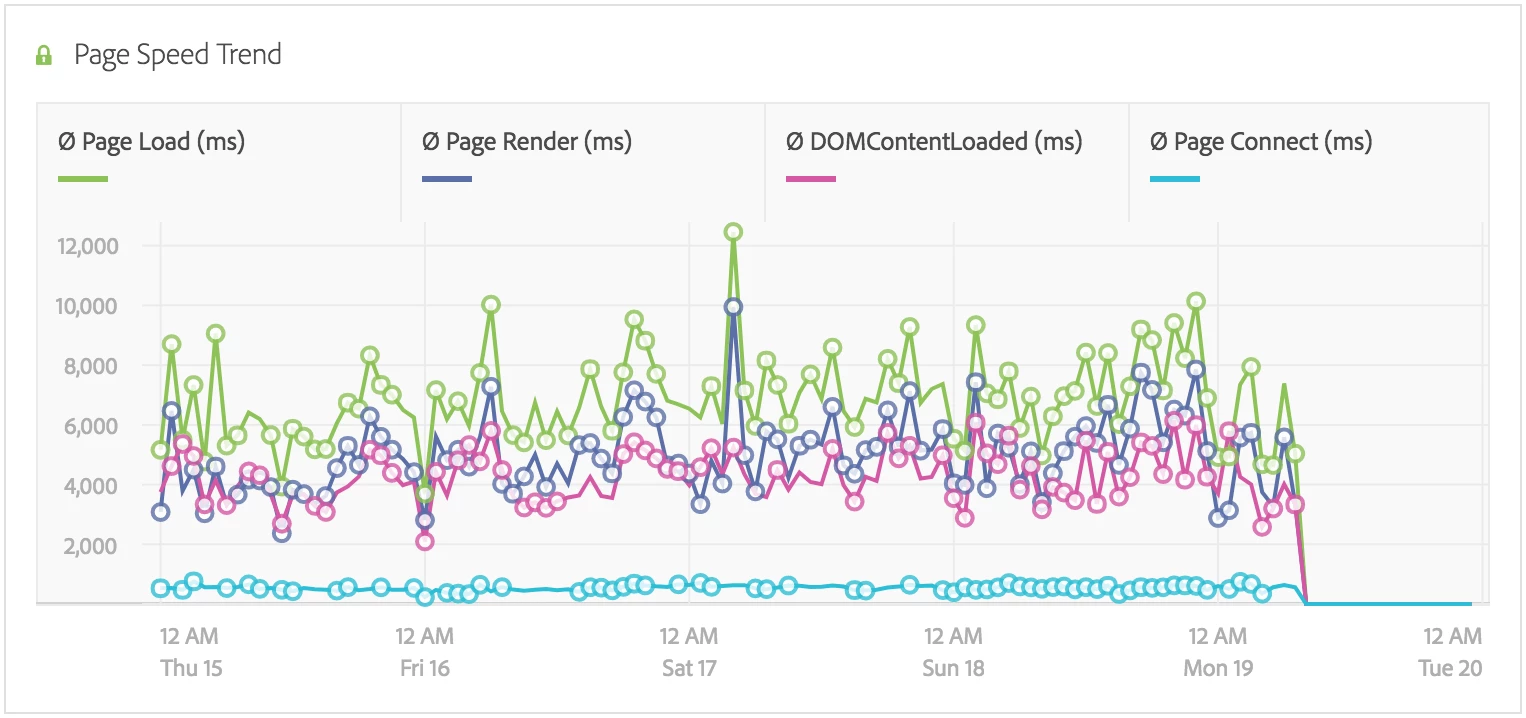
Is there an option to turn the circles off somehow? If I hover my mouse cursor over the data table, then the circles are hidden, but this is not very user friendly.

This post is no longer active and is closed to new replies. Need help? Start a new post to ask your question.
jorisdebeer
jorisdebeerAccepted solution
Level 4
Mar 27, 2018 10:07 PM UTC

Clientcare have confirmed this is a bug, and expect a fix in the next release.

13 replies

Gigazelle
Employee
Aug 8, 2018 7:17 PM UTC

Perfect - confirmed as closed on Adobe's end as well. Thanks so much!

Translate
jorisdebeer
Level 4
Aug 8, 2018 2:49 AM UTC

Hi Gigazelle​,

Below is the reply I received:

[Incident: 180320-000027]

The bug raised with the Engineering team has confirmed that the fix of this issue would be released in April. Please let me know if there is anything else I may assist you with and I would be glad to take it forward?

Translate
Gigazelle
Employee
Aug 7, 2018 10:07 PM UTC

jorisdebeer - Did you get a confirmation that this was fixed? Do you have either a bug ID or incident number that I can reference to resolve this forum thread?

Translate
jorisdebeer
jorisdebeerAuthorAccepted solution
Level 4
Mar 27, 2018 10:07 PM UTC

Clientcare have confirmed this is a bug, and expect a fix in the next release.

Translate
GaMeur1
Level 3
Mar 21, 2018 1:30 PM UTC

Let me add that the circles are exactly at the same spot than anomalies when "Show anomalies" option is checked, they just change of size... So the problem is just that we cannot hide the anomalies anymore on line charts!

Translate
jorisdebeer
Level 4
Mar 20, 2018 9:04 PM UTC

Unfortunately that seems to have no effect. Below I have chosen the max items allowed of 19, although because of my date selection of Mar 14-Apr 1, it seems Adobe Analytics has decided Mar 15 and 17 have anomalies for the Visits metric.

I suspect this is a bug, and have opened a ticket with ClientCare.

Translate
Pablo_Childe
New Participant
Mar 20, 2018 8:47 PM UTC

ok try this... turn on Limit Max items but in teh following po up go to last possible selection.(click on the bottom most result) what happens then?

Translate
jorisdebeer
Level 4
Mar 20, 2018 8:13 PM UTC

Hi pabloc82923542​,

Yes, Limit Max Items is turned off in the chart prefs. See below:

Feedback from Clientcare is that this is working by design which seems a bit weird to me.

Many thanks

Translate
Pablo_Childe
New Participant
Mar 20, 2018 7:51 PM UTC

Can you check do you have limit max items turned on in the chart prefs? if so please turn them off.

Translate
Level 4
Mar 19, 2018 8:23 PM UTC

I had already opened one when we started seeing it. Customer Care seem initially unsure whether this is a feature or a bug. But it is certainly annoying.

Translate