Remove circles from line charts | Community
Skip to main content
jorisdebeer
New Participant
March 19, 2018
Solved

Remove circles from line charts

  • March 19, 2018
  • 13 replies
  • 11906 views

Since the February release of Adobe Analytics workspace, line charts have little circles around many data points, even when Show Anomalies has been turned off.

The circles obscure the data, and make it harder for the readers to view the trend.
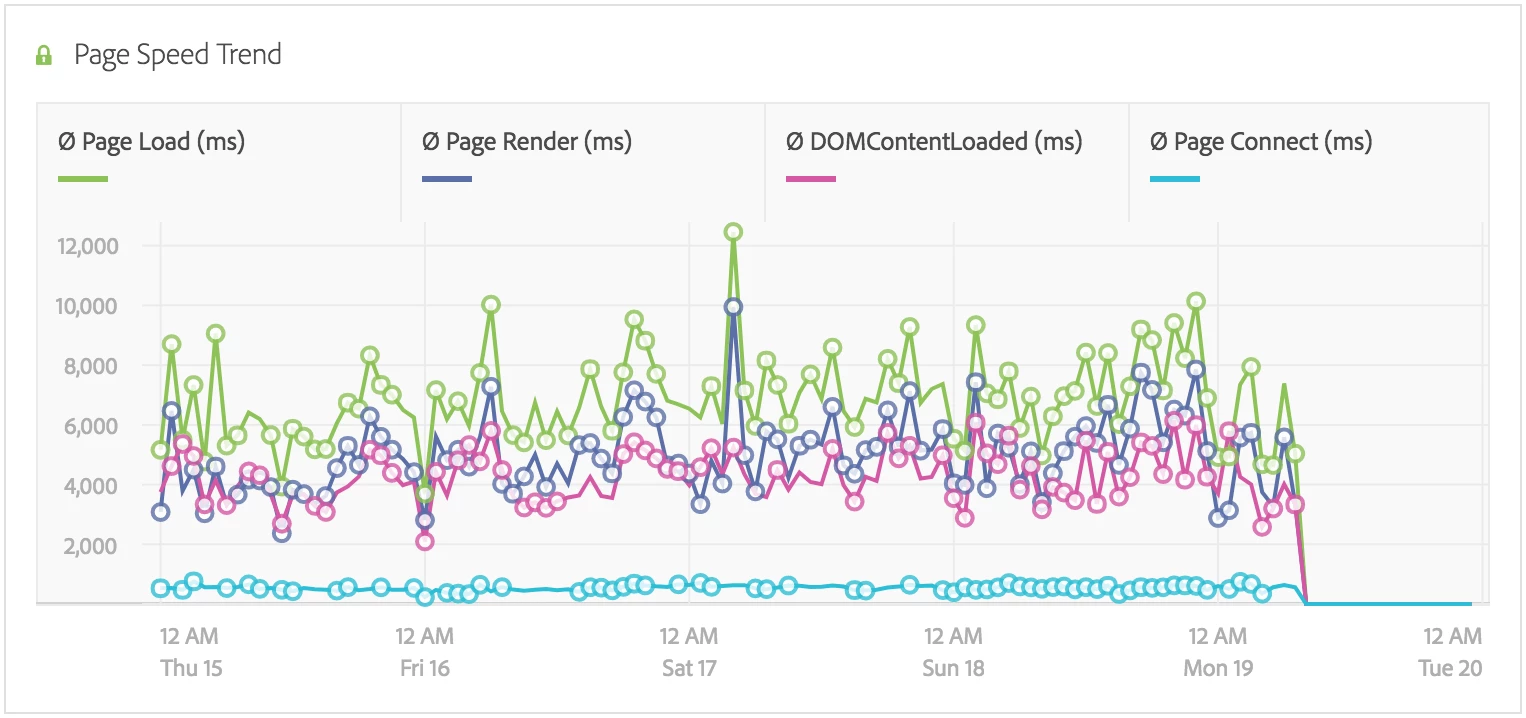
Is there an option to turn the circles off somehow? If I hover my mouse cursor over the data table, then the circles are hidden, but this is not very user friendly.

This post is no longer active and is closed to new replies. Need help? Start a new post to ask your question.
Best answer by jorisdebeer

Clientcare have confirmed this is a bug, and expect a fix in the next release.

13 replies

GaMeur1
New Participant
March 19, 2018

Hi, I noticed exactly the same behavior on my side! So, I think it's a bug.

Maybe you should create a ticket to Customer Care...

jorisdebeer
New Participant
March 19, 2018

I created a new chart using just Visits and Page Views, and the circles still show up despite Show Anomalies being unchecked.

But I think it is somehow related to the anomalies feature because if I turn them on, then they appear over the same data points shown below.

PratheepArunRaj
New Participant
March 19, 2018

Sorry Joris,

Unable to see from my end.

Thank You

Arun