Workspace - rolling dates / date range compare | Community
Skip to main content
New Participant
January 17, 2019
New

Workspace - rolling dates / date range compare

  • January 17, 2019
  • 23 replies
  • 20252 views

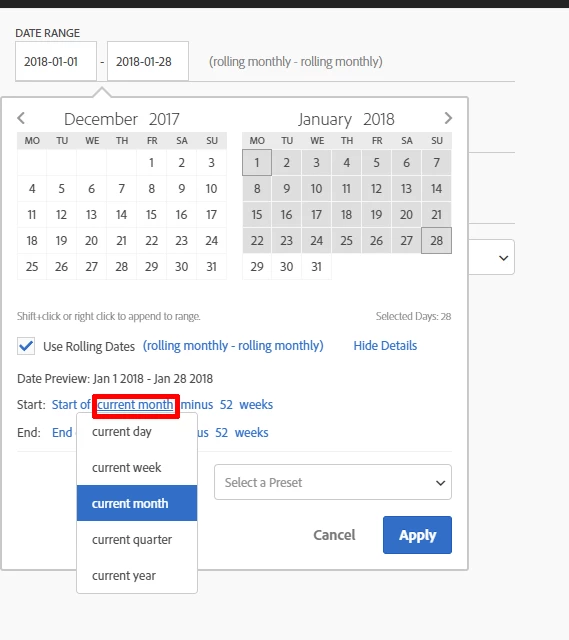
There is an important option missing in the date rage panel.

We can select the current period but not the selected period of the workspace. So it's not possible to create dynamic comparison to the current time range users set in the workspace.

In other words we absolutely need these options:

- current day

- current week

- current month

- current quarter

- current year

- current date range
23 replies

jantzen_b
Employee
October 27, 2020
No text available
New Participant
October 19, 2020

+1

New Participant
October 1, 2020

This really needs to get done. Once you've set up a weekly report (or any other report) with variances it needs to be possible to change the panel dates to a different week and for the the percentage change variances to follow suit. Its crazy to have such a rich tool and not enable this feature

New Participant
September 29, 2020

Adding my +1 for this. Especially if custom date ranges could work off from an 'anchor' date so report users could easily look at time period comparisons like week over week and year over year for past dates. Thanks!

New Participant
September 21, 2020

Update on this would be awesome! 

New Participant
August 27, 2020

is there any update?

New Participant
July 20, 2020

Hi,

any news on this idea?

New Participant
February 11, 2020

Hi.


Was there ever a release to support comparisons based on 'current date selection'? I cant find a way to do it and it would be endlessly helpful.


Thanks,

Employee
February 14, 2019

Sorry for the delay in response.  Good callout on the idea of locking down the date range.  Currently the only option we currently support for this would be sharing a PDF.  The good news is we are actively working on another sharing option that is more locked down than current sharing, but more dynamic than PDF.  This is good feedback to consider there.  Thanks!

New Participant
January 21, 2019

POINT #1

Great. Looking forward to use it!

POINT #2

You are right, thanks!

POINT #3 - NEW

For many reasons the content of a panel is working on a certain time frame only. So it's important not to allow end-users to change the time range of a report. What do you thing about this: