Workspace - rolling dates / date range compare | Community
Skip to main content
New Participant
January 17, 2019
New

Workspace - rolling dates / date range compare

  • January 17, 2019
  • 23 replies
  • 20252 views

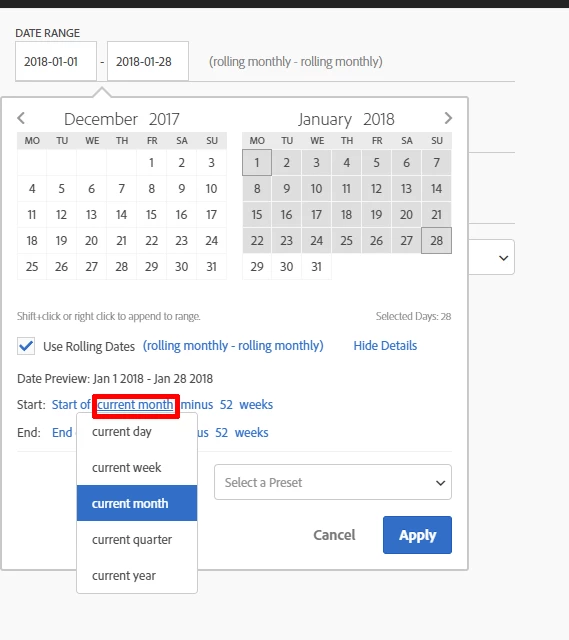
There is an important option missing in the date rage panel.

We can select the current period but not the selected period of the workspace. So it's not possible to create dynamic comparison to the current time range users set in the workspace.

In other words we absolutely need these options:

- current day

- current week

- current month

- current quarter

- current year

- current date range
23 replies

Employee
January 18, 2019

Great - thanks for the clarification.  Completely agree that this would be valuable, and we've discussed how to solve this problem in a scalable way various times, and have it on the backlog.  We have discussed the idea of creating an "anchor date" which a given reporting request would respect (right now it's always "today"), which would also solve this problem in a similar way.  One issue with letting rolling date ranges include panel date ranges is that rolling date ranges can work outside of the context of a panel (ie, in a segment).  Regardless, we are definitely on it and understand the importance of this and will continue to iterate on how to best solve this problem, so we can provide you with the appropriate value as soon as we can.

On the second idea - agree on this as well.  Have you tried setting up dropdown filters on your panel with date ranges in them?  That might be a good way to solve the problem, and gets you close to what you want.  We are considering allowing a date-based dropdown filter to replace the calendar altogether, and would provide a similar experience to what you are proposing.

Thanks for the discussion!

New Participant
January 17, 2019

Yes, always and only the panel date range. It's simple but so incredibly useful for us. It allows to have a unique comparison column depending on the current date range. Today we have to create so many duplicated tables for each type of comparison we need, and that makes our report so heavy and unreadable.

Believe me, it's a cool option for us.

By the way, have a look at this idea:

For analytics team is fine to set the date range from the list of pre-existing options. But for other users it's impossible to dig into that technical overlay. Why dont you allow to add buttons and so quickly jump from a selected date range to other?

Employee
January 17, 2019

Thanks for the feedback - I like this idea.  Would you expect "current date range" to always (and only) represent the panel date range?  Or would you expect it to take into consideration other date objects, for example from other custom date ranges or dimension items in a table where this rolling date range was being used?