Asset upload - dam:physicalheightindpi calculation | Community
Skip to main content
New Participant
October 13, 2023
Solved

Asset upload - dam:physicalheightindpi calculation

Hello All,


Could anyone point me to more details of how the below fields are calculated for any asset uploaded to AEM DAM? Which workflow step is responsible for it?
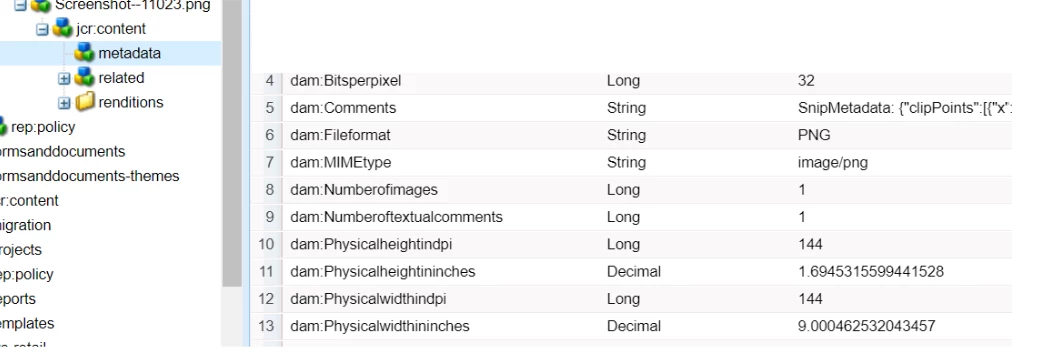


dam:Physicalheightindpi

dam:Physicalheightininches

dam:Physicalwidthindpi

dam:Physicalwidthininches


Thanks in Advance!

This post is no longer active and is closed to new replies. Need help? Start a new post to ask your question.
Adilos-Cantuerk
Adilos-CantuerkAccepted solution
New Participant
October 17, 2023

I believe this is a setting that is made with Photoshop within the picture.
Open up a picture in Photoshop, then select image > image size 
on the bottom you see the value in the resolution that was assigned to the picture.

3 replies

Adilos-Cantuerk
New Participant
October 17, 2023

I just had a quick test - opened up a picture, set the resolution to 123ppi and uploaded it into DEV.
As expected - the file now looks like this:

Why does this value bother you? 
Does it have an impact on something? 
Pixel size matters for most use cases - not dpi/ppi

Translate
bk5Author
New Participant
October 18, 2023

Thanks @adilos-cantuerk for the update.

We get value as "-1" for both dam:Physicalheightindpi and 

dam:Physicalwidthindpi for most of the (90%) assets and thus wanted to check what logic is responsible for this.

Translate
Adilos-Cantuerk
Adilos-CantuerkAccepted solution
New Participant
October 17, 2023

I believe this is a setting that is made with Photoshop within the picture.
Open up a picture in Photoshop, then select image > image size 
on the bottom you see the value in the resolution that was assigned to the picture.

Translate