Can I get a common schema across Classic and Touch? | Community
Skip to main content
jimp38732070
New Participant
September 5, 2017
Solved

Can I get a common schema across Classic and Touch?

  • September 5, 2017
  • 8 replies
  • 4979 views

This is what drove this question. 

The use case is that I have two folders that are sub-folders to a top folder.  The top folder has a specific schema that was created and applied via touch UI so the two sub-folders inherit that schema.

Each sub-folder has a metadata profile applied to them that is unique to each sub-folder.

If I select multiple assets in ONE folder and select properties to bulk edit, all is well and the edit utilizes the applied schema.

If I select multiple assets from both sub-folders (via a search result or a collection that contains files from both folders) and then select Properties to do a bulk edit, i get that very simple schema.  I think its the default classic ui schema. 

Can I make the classic UI schema the same as my Touch UI schema, or can I get the bulk edit to always use the schema applied via Touch UI?

Thanks,

jim P
This post is no longer active and is closed to new replies. Need help? Start a new post to ask your question.
Best answer by Sushant_Bhasin

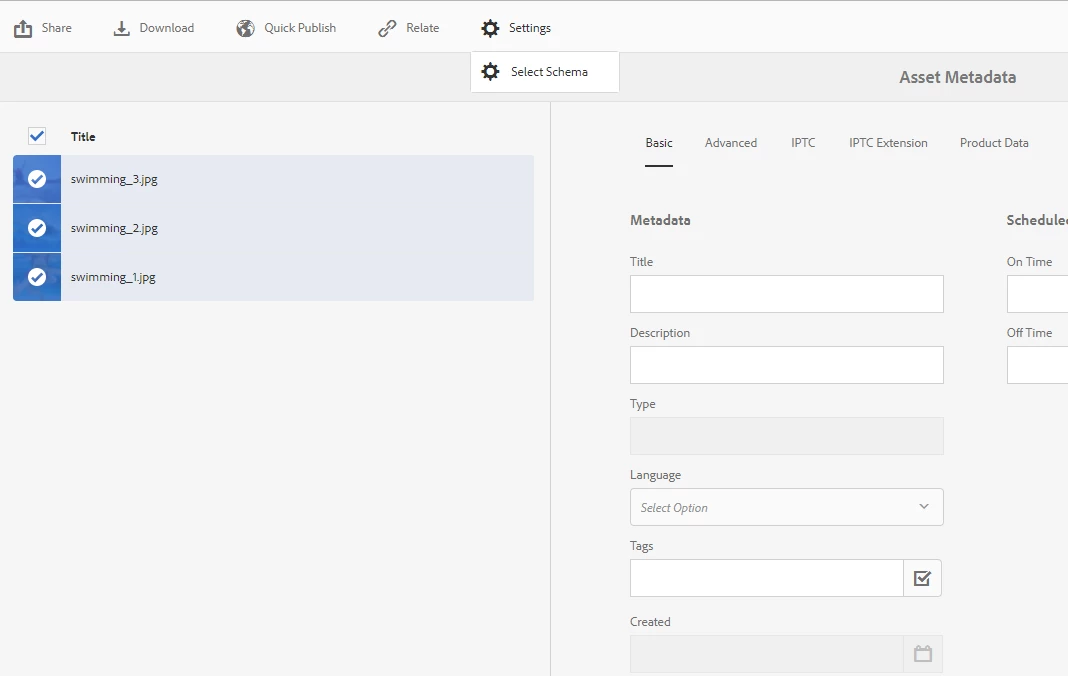
You can apply different schema when bulk editing from settings > select schema

Feature available from AEM 6.3

8 replies

jimp38732070
New Participant
September 6, 2017

Well that certainly solves that issue.  Thanks Sushant!

Jim P

Sushant_BhasinAccepted solution
New Participant
September 6, 2017

You can apply different schema when bulk editing from settings > select schema

Feature available from AEM 6.3

Employee
September 6, 2017

AFAIk and AFAIU in case of different formats or selecting assets from different locations it shows default schema.

Thanks

jimp38732070
New Participant
September 5, 2017

I can see whats happening here.  Since the assets are from different folders, if you try and select them and then select "Properties" to do a bulk edit to those files, the system pulls the "default" schema for that.  If I make the "default" schema look like our special one for Enterprise, it shows all those fields when you do the bulk edit, but that will be a problem if the "default" schema is the same as the Enterprise one going forward I would think.

An I right there, its referencing the default schema instead of the schema that both assets are comprised of (enterprise schema)?

Jim P

jimp38732070
New Participant
September 5, 2017

Thanks Scott.  This may be me using incorrect terminology.  The bulk edit I was referring to is different than the one you were pointing to.

If I select two files in the same directory and then go up to the Nav and select Properties, I get this screen (I would call this a bulk edit)  Notice the fields in the schema. 

If I select one file from the same directory above (datasheets), and one file from a different directory (from a search result) and select Properties from the Nav bar, I get this screen.  Completely different schema.  The only difference is these two assets are located in different folders (but the same schema)

smacdonald2008
New Participant
September 5, 2017

When using the bulk editor - you have to specify a root path - as discussed in the docs:

The Bulk Editor

Are you assets located under a specific Root path? 

jimp38732070
New Participant
September 5, 2017

Since all the assets were ingested via Touch UI and utilize a highly expanded schema, any bulk edits need to be able to edit any field in that schema.  When assets are in different folders (or have different profiles? I don't know which), I can't do a bulk edit and use that expanded schema, I'm limited to the little default schema in classic.

Thanks,

Jim P

smacdonald2008
New Participant
September 5, 2017

What are you trying to do - I am unclear of what you are trying to accomplish.