Hiding the download option for assets in author instance | Community
Skip to main content
New Participant
March 12, 2024
Solved

Hiding the download option for assets in author instance

  • March 12, 2024
  • 4 replies
  • 2110 views

Hi Team,

I have a requirement where i want to hide the download button for the expired assets. We already moving the expired assets to the archive folder, now we want to restrict the download access. so we don't want to show the download option in AEM author in all ways around.

If anyone knows how to handle this in a better way, please let me know here. Thanks in advance!
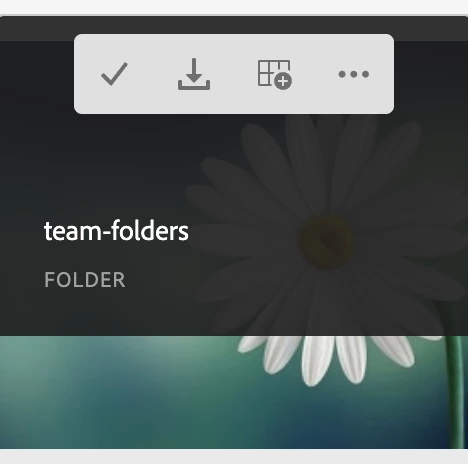
 

Regards,

Bhavani Bharanidharan



This post is no longer active and is closed to new replies. Need help? Start a new post to ask your question.
Best answer by Adilos-Cantuerk

Hi @bhavanibharani how do you make your assets expired?
The OOTB situation is, that an asset that reached its expiration date. (jcr:content/metadata/prism:ExpirationDate) is no longer downloadable by the users. The download option does not appear, the thumbnail gets a red flag icon and even the AssetLink plugin is no longer able to get the image. This does not work for an admin account (edit: so in order to test it, you need to check with a different account.)

4 replies

Kamal_Kishor
New Participant
March 14, 2024

@bhavanibharani : If you are already moving assets to a different folder i.e archive, can you try by removing the permission to download.
Please refer on how to remove disable button with user permissions: https://experienceleaguecommunities.adobe.com/t5/adobe-experience-manager-assets/aem-assets-enable-download-button-based-on-user-group/td-p/421404

thanks.

kautuk_sahni
Employee
March 14, 2024

@bhavanibharani Did you find the suggestions from users helpful? Please let us know if more information is required. Otherwise, please mark the answer as correct for posterity. If you have found out solution yourself, please share it with the community.

Kautuk Sahni
Adilos-Cantuerk
Adilos-CantuerkAccepted solution
New Participant
March 12, 2024

Hi @bhavanibharani how do you make your assets expired?
The OOTB situation is, that an asset that reached its expiration date. (jcr:content/metadata/prism:ExpirationDate) is no longer downloadable by the users. The download option does not appear, the thumbnail gets a red flag icon and even the AssetLink plugin is no longer able to get the image. This does not work for an admin account (edit: so in order to test it, you need to check with a different account.)

Adilos-Cantuerk
New Participant
March 14, 2024

@bhavanibharani I forgot to mention that the this expiration via prism:ExpirationDate does also depublish the asset. So it is something that needs to be handled with care.
It might be a usefull thing to do, to create a workflow that warns a group of admins (like a week in advance), when an asset will be depublished by the expiration, and is still in use on sites somewhere. 
AND Librarians need to be taught not to set an expiration date in a past date, not until checking if the file might be in use somewhere. 
From your screenshot, you tried to download the folder.
This should deliver only assets within that folder that are not expired.

New Participant
March 14, 2024

Hi @adilos-cantuerk ,

Thank you. when checked that the download button is not visible for the expired assets for the non-admin users.

Yes we are sending a remainder mail to the folder/ asset owners before 3 months from the expiry date. but still we are thinking to unpublish the same when expired. 


Thanks & Regards,

Bhavani Bharanidharan

EstebanBustamante
New Participant
March 12, 2024

Hi, 

You can use a granite:rendercondition to hide the button based on a specific group. This article explains pretty clearly how to achieve such behaviorhttps://jpsoares.medium.com/aem-granite-render-conditions-438c804b1e5a


Hope this helps

Esteban Bustamante
New Participant
March 13, 2024

Hi @estebanbustamante,

Thanks for your response. As i am checking the blogs for path granite render conditions. I want to know how i can implement to hide the download button for the assets inside the archive folder also showing the button only for admins.

I can mention the archive folder path in the sling:resourcetype and type as ./path, but how to give the groups also? If yes how to apply two things like both path and group restrictions? and do i need to overlay the /libs/dam/gui/content/assets/jcr:content/actions/selection/download from /libs/ to /apps/my-project to make the changes for granite:rendercondition?   how to apply two things like both path and group restrictions?

Can you please let me know the answers for the above. Thank you.