
Grab the title of a tag from asset metadata in Native PDF | Community
Skip to main content
rkody
New Participant
July 24, 2024
Solved

Grab the title of a tag from asset metadata in Native PDF

  • July 24, 2024
  • 2 replies
  • 799 views

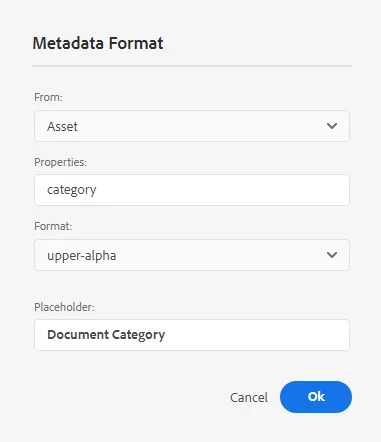
Is there any way to grab the tag title in a native pdf field? I have a custom metadata field on my asset called category, and it is a tag field. When rendering the pdf I get the full path to the tag, but I want to display the title instead.

i.e. The below displays "PROJECT:DOCUMENT-TYPE/DOCUMENT-TYPE" and I want it to display "Document Type Title"
 

This post is no longer active and is closed to new replies. Need help? Start a new post to ask your question.
Best answer by Surbhi_Maheshwari

Yes, you will need to keep the value you want in output i.e. text as value in crx/de.

Please give it a try and let me know how it goes.

2 replies

kautuk_sahni
Employee
August 1, 2024

@rkody Did you find the suggestions from users helpful? Please let us know if you require more information. Otherwise, please mark the answer as correct for posterity. If you've discovered a solution yourself, we would appreciate it if you could share it with the community. Thank you!

Kautuk Sahni
Employee
July 25, 2024

Hi,


In your case whatever value you have set in Category will be coming in Native PDF output. 

Can you share a screenshot of this Category asset metadata property? 

Also please refer to https://experienceleague-review.corp.adobe.com/docs/experience-manager-guides/using/install-guide/on-prem-ig/output-gen-config/config-native-pdf-publish/design-page-layout.html . Go to "Add fields and metadata" section. You will find various ways you can use metadata from ditamaps and topics.


Thanks and Regards,
Surbhi Maheshwari

rkody
rkodyAuthor
New Participant
July 25, 2024

Yes I have that property set up to be a tag.


Metadata schema:

On the Asset:

CRXDE:


It sounds like I will have to just use a text property in the schema and manually add the document type instead of using tags.

Surbhi_MaheshwariAccepted solution
Employee
July 25, 2024

Yes, you will need to keep the value you want in output i.e. text as value in crx/de.

Please give it a try and let me know how it goes.