How can I display <topicmeta> from a map to Native PDF Output? | Community
Skip to main content
This post is no longer active and is closed to new replies. Need help? Start a new post to ask your question.
Surbhi_MaheshwariAccepted solution
Employee
June 27, 2024

Hi Josh,


Do you want to show a value from topicmeta e.g. author in your native PDF output?

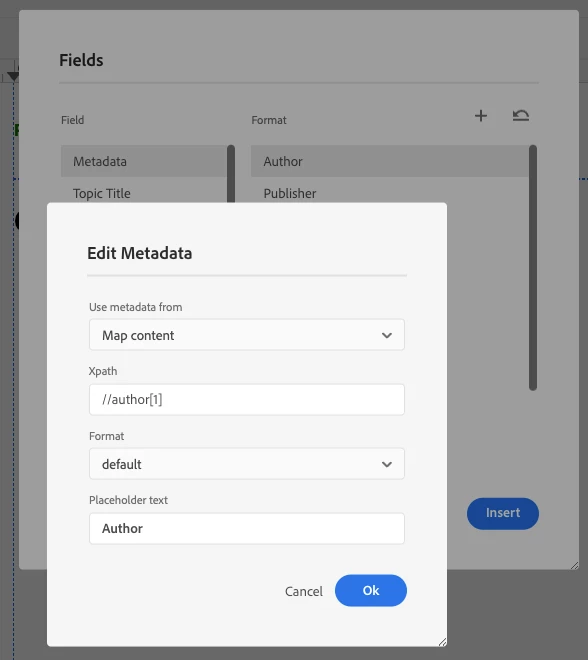
If yes, there is an option to insert that in page layout of PDF template. From top toolbar, you can insert Fields > metadata > select the one you want to insert (select Map content from drop down in your case).

In generated PDF output you will see the value of let's say author element from topicmeta of ditamap.

PFA screenshot below:


Thanks and Regards,
Surbhi Maheshwari

4 replies

Surbhi_MaheshwariAccepted solution
Employee
June 27, 2024

Hi Josh,


Do you want to show a value from topicmeta e.g. author in your native PDF output?

If yes, there is an option to insert that in page layout of PDF template. From top toolbar, you can insert Fields > metadata > select the one you want to insert (select Map content from drop down in your case).

In generated PDF output you will see the value of let's say author element from topicmeta of ditamap.

PFA screenshot below:


Thanks and Regards,
Surbhi Maheshwari

Translate
Level 4
June 27, 2024

Thanks so much for your quick reply, Surbhi! 🙂

I should have clarified - my apologies!

What I mean by <topicmeta> in maps is this:

I know this probably isn't the best use of DITA, but unfortunately this scenario is present in our legacy content.

Is there any easy way to get this to show, or is it necessary to make these into topics?

Thanks again!

Josh

Translate