6.3 Touch UI Customization - Adding custom toolbar action | Community
Skip to main content
New Participant
August 14, 2017
Solved

6.3 Touch UI Customization - Adding custom toolbar action

  • August 14, 2017
  • 4 replies
  • 2233 views

Hi,

I am trying to add a custom action to the component toolbar as shown below.
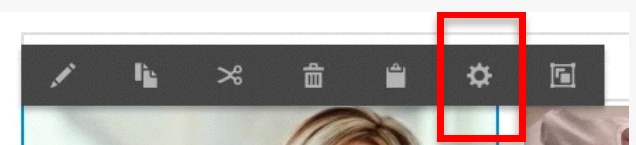
I could find a documentation for AEM 6.0 mentioning the steps. I tried that, it did not work and then component dialogue is not opening up. Followed following steps in AEM 6.3.

  • Created a node of type cq:EditConfig under cq:editConfig node as shown in attached image.
  • Also added properties to it. But, after that it did not open up the component dialogue.

Anyone has tried this in 6.3?

When I click on component, it shows nothing.

Thanks,

ITSAMB

This post is no longer active and is closed to new replies. Need help? Start a new post to ask your question.

4 replies

AMB13Author
New Participant
August 22, 2017

Thank you Scott your help. I could add custom action with the link you provided.

I have one question though on the other approach (Solution - 1) mentioned in http://experience-aem.blogspot.in/2015/04/aem-6-sp2-touch-ui-open-component-dialog.html.  I tried this but it is still not working for me.

Does this solution only work for <6.2 ? Is it not applicable for AEM 6.3?

Thanks,

ITSAMB

smacdonald2008
smacdonald2008Accepted solution
New Participant
August 15, 2017
smacdonald2008
New Participant
August 14, 2017

Here is an AEM 6.2 article that may help you on this use case: http://experience-aem.blogspot.com/2015/04/aem-6-sp2-touch-ui-open-component-dialog.html

smacdonald2008
New Participant
August 14, 2017

Are you getting any browser errors?