6.5 RTE Touch Enabled UI | Community
Skip to main content
christopher5624
New Participant
May 18, 2021
Solved

6.5 RTE Touch Enabled UI

  • May 18, 2021
  • 1 reply
  • 1332 views

I am reposting this, hoping someone has an example text component configuration that can be uploaded. 


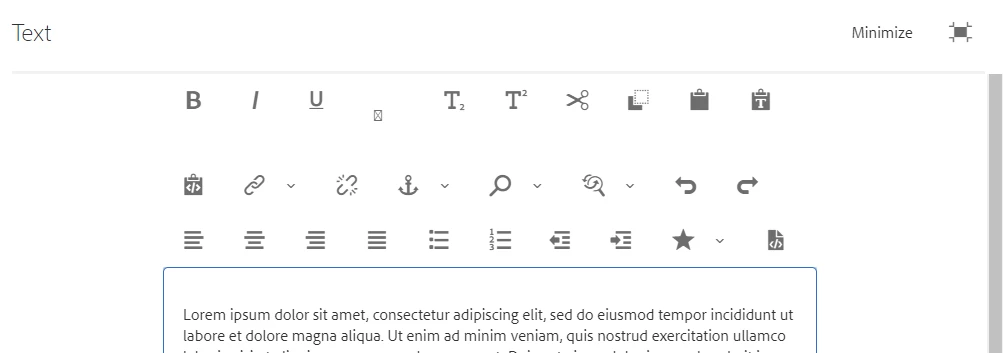
Upgrading from 6.2 to 6.5. Hopefully this is just a setting/configuration issue but I can't get the RTE to be styled as it was in 6.2. When I open the editor in fullscreen in 6.5 I get the following styling (I believe this is Dialog Full Screen):


Do not want this style:


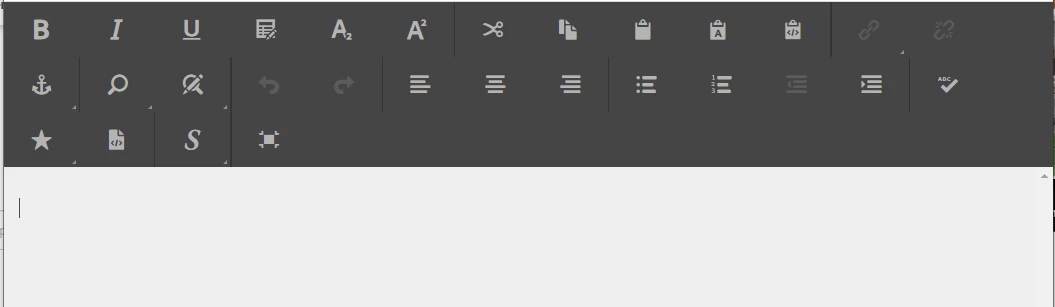
What I am looking for is the style I see in 6.2 (RTE Full Screen):


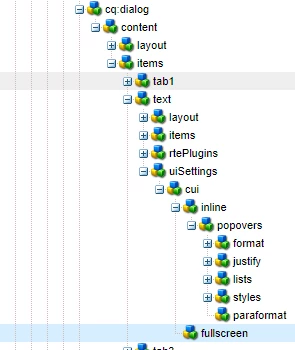
I've searched for the different uiSettings (haven't found much) and have tried different configurations - to no avail. Any help on this would be greatly appreciated. Here is my current node structure:



This post is no longer active and is closed to new replies. Need help? Start a new post to ask your question.
Best answer by Asutosh_Jena_

Hi @christopher5624 


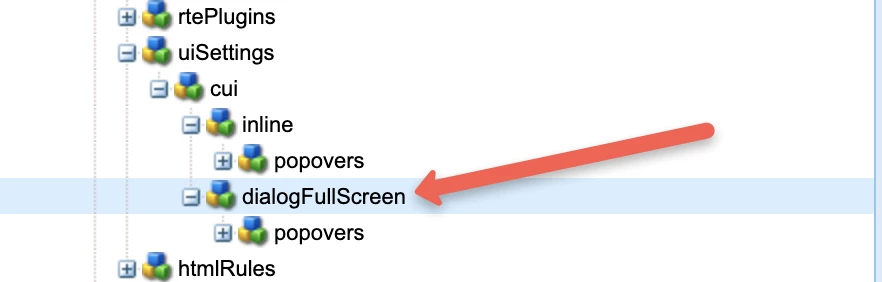
You need to add "dialogFullScreen" node parallel to "inline" node within "cui" and copy the same "popovers" properties. This will enable the fullscreen mode.


Thanks!

1 reply

Asutosh_Jena_
Asutosh_Jena_Accepted solution
New Participant
May 19, 2021

Hi @christopher5624 


You need to add "dialogFullScreen" node parallel to "inline" node within "cui" and copy the same "popovers" properties. This will enable the fullscreen mode.


Thanks!

christopher5624
New Participant
May 20, 2021
@asutosh_jena_, This setting did not work. The
New Participant
March 1, 2024

Did anyone was facing RTE Hyperlink issue in edit authoring dialog in 6.5.17 AEM