Adding items on top in multifield component | Community
Skip to main content
New Participant
Jun 4, 2020 9:47 AM UTC
Solved

Adding items on top in multifield component

Whenever a new entry is added in multifield component that will appear at the bottom and we need to manually move each row upwards unless it reaches top. Is there a way to add items on top in multifield component?

This post is no longer active and is closed to new replies. Need help? Start a new post to ask your question.
Nupur_Jain
Nupur_JainAccepted solution
Employee
Jun 4, 2020 3:10 PM UTC

Hi @sagars 


I have written a code snippet for you that should work.


To allow your multifield to add item to top, follow these steps:
1. Add granite:id property to your multifield node with value "multifield-custom-insert-first". That should look like this:
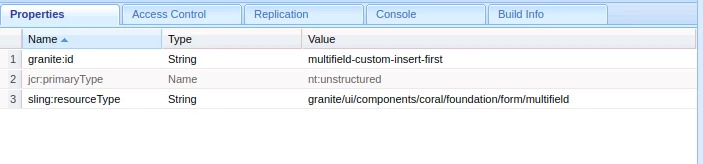
2. Create clientlib with category "cq.authoring.dialog" and add the below JS code to it.


(function(document, $) { "use strict"; $(document).on("dialog-ready", function() { var MULTIFIELD_CUSTOM_FIRST_ID = "multifield-custom-insert-first"; var multifieldCustomItemsCount = 0; var customMultifield = $('#' + MULTIFIELD_CUSTOM_FIRST_ID); if (customMultifield.length) { multifieldCustomItemsCount = customMultifield[0].items.length; } $('#' + MULTIFIELD_CUSTOM_FIRST_ID).on("change", function(event) { if(event.target.id == MULTIFIELD_CUSTOM_FIRST_ID){ if(event.target.items.length != 1 && event.target.items.length > multifieldCustomItemsCount){ event.target.insertBefore(event.target.items.last(), event.target.items.first()); multifieldCustomItemsCount = event.target.items.length; } } }); }); })(document, Granite.$);


Try this and let me know.


Hope it helps!

Thanks,

Nupur



8 replies

khamat_bn
Level 4
Jun 4, 2020 3:30 PM UTC

Hi @sagars,

Its whenever we adds item in multifield it will be added at bottom only. In order to make it on top We should try to overlay base component and need to add logic to JS for this.

You can overlay multifield component /libs/granite/ui/components/foundation/form/multifield/render.jsp and add custom js logic to add on top. While solution provided by @nupur_jain Should work.

Try and let us know the magic after adding js 🙂 


Translate
Nupur_Jain
Nupur_JainAccepted solution
Employee
Jun 4, 2020 3:10 PM UTC

Hi @sagars 


I have written a code snippet for you that should work.


To allow your multifield to add item to top, follow these steps:
1. Add granite:id property to your multifield node with value "multifield-custom-insert-first". That should look like this:

2. Create clientlib with category "cq.authoring.dialog" and add the below JS code to it.


(function(document, $) { "use strict"; $(document).on("dialog-ready", function() { var MULTIFIELD_CUSTOM_FIRST_ID = "multifield-custom-insert-first"; var multifieldCustomItemsCount = 0; var customMultifield = $('#' + MULTIFIELD_CUSTOM_FIRST_ID); if (customMultifield.length) { multifieldCustomItemsCount = customMultifield[0].items.length; } $('#' + MULTIFIELD_CUSTOM_FIRST_ID).on("change", function(event) { if(event.target.id == MULTIFIELD_CUSTOM_FIRST_ID){ if(event.target.items.length != 1 && event.target.items.length > multifieldCustomItemsCount){ event.target.insertBefore(event.target.items.last(), event.target.items.first()); multifieldCustomItemsCount = event.target.items.length; } } }); }); })(document, Granite.$);


Try this and let me know.


Hope it helps!

Thanks,

Nupur


Translate
arunpatidar
New Participant
Jun 4, 2020 6:07 PM UTC
I would say this is the right approach. handling using custom js using selector. If you are using multiple dropdown in same dialog then changed Id selector to class(granite:class) and use current multifield object. The above JS code also requires a little bit changes in order to support multiple dropdown in same dialog or in case of multifield..
Translate
Arun Patidar
Nupur_Jain
Employee
Jun 4, 2020 10:56 AM UTC

Hi @sagars 


Can you tell which aem version are you using?  what is the resourceType of the multifield?

Translate
sagarsAuthor
New Participant
Jun 4, 2020 11:58 AM UTC
AEM 6.5 and resourceType is granite/ui/components/coral/foundation/form/multifield
Translate
VeenaVikraman
New Participant
Jun 4, 2020 10:52 AM UTC

I believe you might have to customize the multifield JS . 

Translate