Additional decorative tag for inner components | Community
Skip to main content
New Participant
March 7, 2023
Solved

Additional decorative tag for inner components

  • March 7, 2023
  • 3 replies
  • 743 views

Hi all,

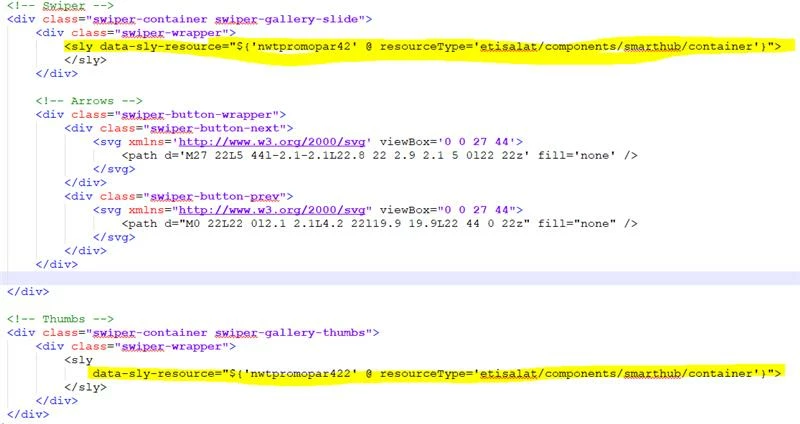
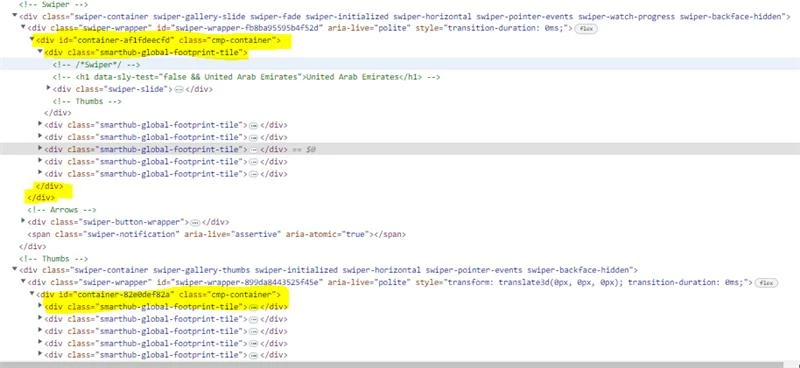
I am trying to create component with inner container. it add additional decorative div for container and inner component added in container. it breaks the expected output. anyone help me to remove the 2 decorative tags created for inner container and inner component.


code:
Output:


This post is no longer active and is closed to new replies. Need help? Start a new post to ask your question.
Best answer by bilal_ahmad

Hi! you can follow this blog to get your answers. 


https://aemcorner.com/aem-how-to-remove-div-wrapper-from-component/


Thanks, Bilal

3 replies

Fanindra_Surat
New Participant
March 7, 2023

Hi @vjalaldeen -


This can be achieved OOTB, and the following is straight out of the documentation:

Component Controls

The following properties and nodes can be applied to the components to control the behavior of their decoration tag:

  • cq:noDecoration {boolean}: This property can be added to a component and a true value forces AEM not to generate any wrapper elements over the component.

  • cq:htmlTag node : This node can be added under a component and can have the following properties:

    • cq:tagName {String} : This can be used to specify a custom HTML tag to be used for wrapping the components instead of the default DIV element.
    • class {String} : This can be used to specify css class names to be added to the wrapper.

Ref: https://experienceleague.adobe.com/docs/experience-manager-65/developing/components/decoration-tag.html?lang=en


Hope this helps you!

Rohit_Utreja
New Participant
March 7, 2023
bilal_ahmad
bilal_ahmadAccepted solution
New Participant
March 7, 2023

Hi! you can follow this blog to get your answers. 


https://aemcorner.com/aem-how-to-remove-div-wrapper-from-component/


Thanks, Bilal