ADOBE : TABLE - Hide ROW NOT Working - ONLY INVISIBLE | Community
Skip to main content
New Participant
March 2, 2024

ADOBE : TABLE - Hide ROW NOT Working - ONLY INVISIBLE

  • March 2, 2024
  • 3 replies
  • 1105 views

Hello Guys,


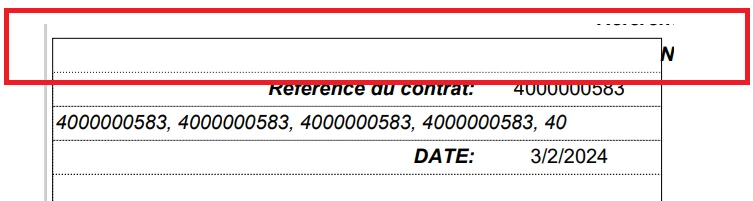
A basic question, I created a Table in my page, and I want to HIDE a ROW by default in JAVASCRIPT cause I will add afterwards conditions. The problem is: my row is never HIDDEN but only INVISIBLE. Consequently, the others rows below never take place of the HIDDEN row. I don't see anything wrong in my code. Could you please have a look on it:
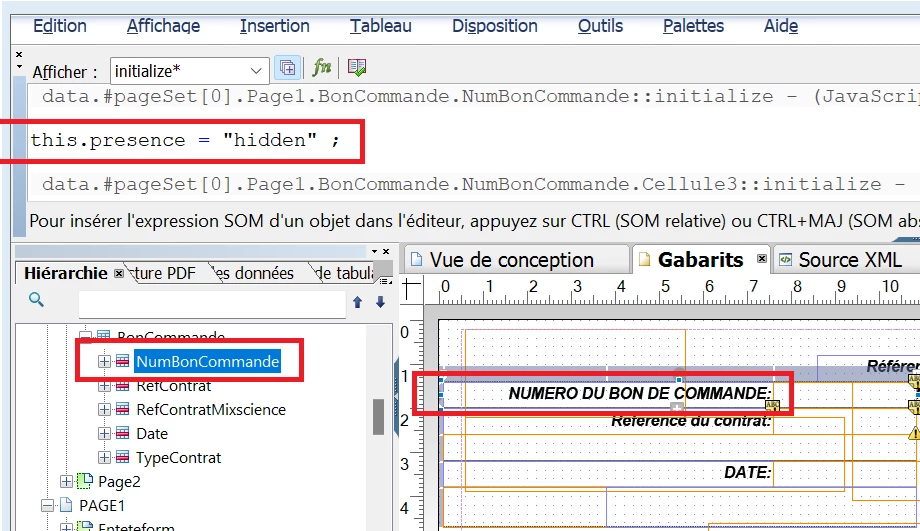


The row is always here, invisible but NOT hidden:


Best regards,

RR.

This post is no longer active and is closed to new replies. Need help? Start a new post to ask your question.

3 replies

kautuk_sahni
Employee
March 7, 2024

@rachidr_ Did you find the suggestions from users helpful? Please let us know if more information is required. Otherwise, please mark the answer as correct for posterity. If you have found out solution yourself, please share it with the community.

Kautuk Sahni
arunpatidar
New Participant
March 4, 2024

Hi @rachidr_ 
Please check this on dedicated Adobe Livecycle community to get faster responses

https://community.adobe.com/t5/acrobat/ct-p/ct-acrobat?page=1&sort=latest_replies&lang=all&tabid=all 

Arun Patidar
SureshDhulipudi
New Participant
March 2, 2024

did you try display attribute?


// Hide a table row
document.getElementById("myRow").style.display = "none";

// Show a table row
document.getElementById("myRow").style.display = "table-row";


// Remove a table row
document.getElementById("myRow").remove();

RachidR_Author
New Participant
March 3, 2024

Thank you for reply.


I saw that in Master Pages the JavaScript does not work on the design of the page. The design is static and doesn’t change.


Do you confirm that point too?


Regards.

SureshDhulipudi
New Participant
March 3, 2024

do you mean in design mode?

In Adobe Experience Manager, the JavaScript code might not work in the design mode as it has some restrictions.

Generally design mode has some restrictions with default authoring capabilities.

In design mode, AEM restricts some JavaScript functionalities to prevent interference with the authoring UI. If your JavaScript code is trying to manipulate the DOM or perform other actions that are restricted in design mode, it might not work.