Adobe Targeting configurations | Community
Skip to main content
Umamaheswari_Yakkala
New Participant
Aug 28, 2018 1:27 PM UTC
Solved

Adobe Targeting configurations

Hi Team,

We are trying to push experience fragments to the targeting system.

we are able to push the experience fragments to the targeting but the problem is in the offer details we are always seeing localhost:4503 in the offer details.

Not sure it is coming from where? and how to resolve it.

This is the first time we are doing it.

Any help or pointers that helps a lot.

Thanks

This post is no longer active and is closed to new replies. Need help? Start a new post to ask your question.
kautuk_sahni
kautuk_sahniAccepted solution
Employee
Aug 29, 2018 8:05 AM UTC

Hi,

I would need bit more clarity on the problem statement.

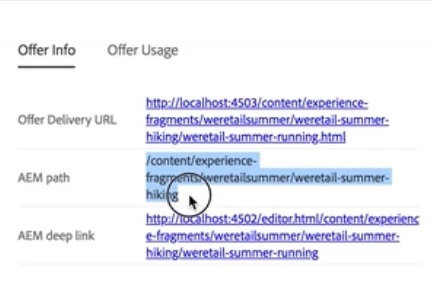
If you are looking at the details of Experience Fragment offer within the Adobe Target, then it should come like this:-

You can go to AEM Deep link (Author Instance) to make any changes to the Experience Fragment and then publish it.

Offer Delivery URL can be changed from (Not Tested):- http://localhost:4502/system/console/configMgr/com.day.cq.commons.impl.ExternalizerImpl

-Kautuk

Kautuk Sahni

7 replies

Umamaheswari_Yakkala
New Participant
Aug 29, 2018 8:33 PM UTC

Thanks Kautuk and edubey , now I am able to see actual server URL as a deeplink in the offer details.

Thanks

Uma

Translate
edubey
Level 10
Aug 29, 2018 3:03 PM UTC

well it may not affect but might change anything in your app which is using externalizer configs. Also consider, that's the main point of using externalizer to create public facing urls instead of localhost and all.

Translate
Umamaheswari_Yakkala
New Participant
Aug 29, 2018 2:51 PM UTC

Ok, Got it. Let me try that.  I believe that it is not gonna affect other things right?

I will update the results soon.

Translate
edubey
Level 10
Aug 29, 2018 2:34 PM UTC

Yes, you have to update externalizer config for offers in target to have proper url instead of localhost:4503

You can change from localhost:4503 to www.example.com

Translate
kautuk_sahni
Employee
Aug 29, 2018 12:56 PM UTC

Not tested, but that can be changed from:- http://localhost:4502/system/console/configMgr/com.day.cq.commons.impl.ExternalizerImpl

-Kautuk

Translate
Kautuk Sahni
Umamaheswari_Yakkala
New Participant
Aug 29, 2018 12:19 PM UTC

Hi Kautuk,

Exactly we are seeing the same.. in offer details but why it is showing localhost:4503, it should be our server right?

or where do we need to update those configurations to show our server name instead of the localhost:4503.

Thanks

Uma

Translate
kautuk_sahni
kautuk_sahniAccepted solution
Employee
Aug 29, 2018 8:05 AM UTC

Hi,

I would need bit more clarity on the problem statement.

If you are looking at the details of Experience Fragment offer within the Adobe Target, then it should come like this:-

You can go to AEM Deep link (Author Instance) to make any changes to the Experience Fragment and then publish it.

Offer Delivery URL can be changed from (Not Tested):- http://localhost:4502/system/console/configMgr/com.day.cq.commons.impl.ExternalizerImpl

-Kautuk

Translate
Kautuk Sahni