AEM 6.1 Video component works on author, not on publish | Community
Skip to main content
New Participant
November 21, 2015
Solved

AEM 6.1 Video component works on author, not on publish

  • November 21, 2015
  • 4 replies
  • 1628 views

HI  Team,

I am trying to use AEM6.1 video component to insert an mp4 video in my page. its working fine in my author instance. but it's not working in publish instance.

This post is no longer active and is closed to new replies. Need help? Start a new post to ask your question.
Best answer by kautuk_sahni

Hi Adding to Praveen's reply, 

Please have a look at this community article :- http://www.wemblog.com/2013/01/how-to-publish-code-component-in-cq.html

// Use Case: You want to publish your code to publish instance.

Solution: There are multiple ways to do this,

1) Package Manager (Recommended):

Go to package manager through <HOST>:<PORT>/crx/packmgr/index.jsp
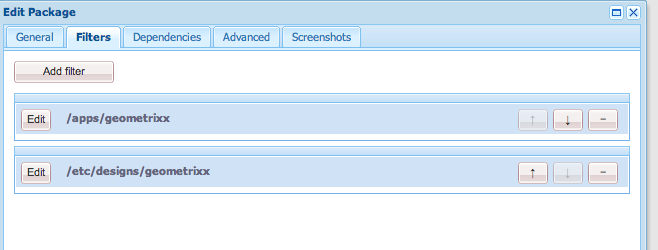
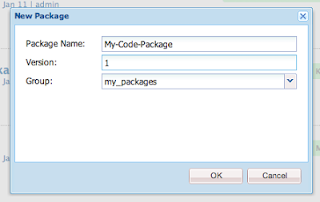
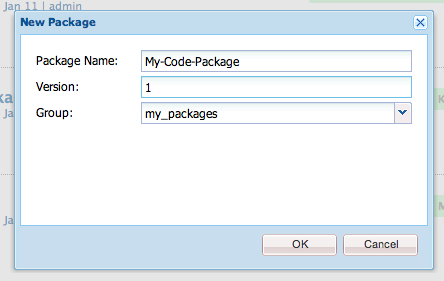
Click on Create package. Give Package name and filter
Once package is created, Click on Edit, Click on filter and select filter for your code. Usually it is /apps/<Your code>, /etc/design/<your code>, Some custom code.
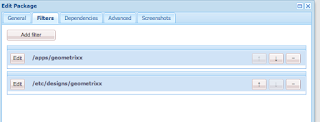
Then click ok and click on build package.
Once package is build you can click on more and then replicate.

If you don't have replicate option (If you are using CQ version less than 5.5), Then download that package and install it in all publish instance.
You can also use curl command to install package on publish instance
Curl command will look like this 
curl -f -u <USERNAME>:<PASSWORD> -F name=<Package Name> -F file=@<Location of downloaded file in file system> -F install=true http://<HOST>:<PORT>/crx/packmgr/service.jsp"/>

Advantage:
You can manage each package
Can uninstall package to go to previous revision
Can migrate package from any environment to any environment
Disadvantage:
Manually build package every time


2) Using Tree activation
Go to welcome page -> tools -> replication -> Activate Tree -> double click

Select root path as your code path. First select /apps/<Your code> then /etc/design/<Your Design>
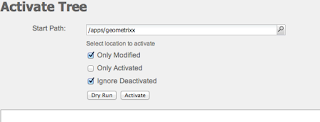
 

Then click on Activate
Advantage:
Simple. You just have to select tree you want to activate
Disadvantage:
Version not supported, Hence you can not revert back to previous code.
 

I hope this would help you.

Thanks and Regards

Kautuk Sahni

4 replies

Jitendra_S_Toma
New Participant
February 18, 2016

Apart from checking missing assets, Kindly check if there is any error on browser console. Could be a javascript issue.

Did you check error.log?. There might be a case when your component breaks on the publish instance.

---

Jitendra

Lokesh_Shivalingaiah
New Participant
February 18, 2016

When you say its not working ?

1. Does the component itself is not rendering ? - Deploy your component on publish instance

2. Only the video is not playing ?? - Publish the DAM assets (video)

kautuk_sahni
kautuk_sahniAccepted solution
Employee
February 18, 2016

Hi Adding to Praveen's reply, 

Please have a look at this community article :- http://www.wemblog.com/2013/01/how-to-publish-code-component-in-cq.html

// Use Case: You want to publish your code to publish instance.

Solution: There are multiple ways to do this,

1) Package Manager (Recommended):

Go to package manager through <HOST>:<PORT>/crx/packmgr/index.jsp
Click on Create package. Give Package name and filter

Once package is created, Click on Edit, Click on filter and select filter for your code. Usually it is /apps/<Your code>, /etc/design/<your code>, Some custom code.

Then click ok and click on build package.
Once package is build you can click on more and then replicate.

If you don't have replicate option (If you are using CQ version less than 5.5), Then download that package and install it in all publish instance.
You can also use curl command to install package on publish instance
Curl command will look like this 
curl -f -u <USERNAME>:<PASSWORD> -F name=<Package Name> -F file=@<Location of downloaded file in file system> -F install=true http://<HOST>:<PORT>/crx/packmgr/service.jsp"/>

Advantage:
You can manage each package
Can uninstall package to go to previous revision
Can migrate package from any environment to any environment
Disadvantage:
Manually build package every time


2) Using Tree activation
Go to welcome page -> tools -> replication -> Activate Tree -> double click

Select root path as your code path. First select /apps/<Your code> then /etc/design/<Your Design>


Then click on Activate
Advantage:
Simple. You just have to select tree you want to activate
Disadvantage:
Version not supported, Hence you can not revert back to previous code.
 

I hope this would help you.

Thanks and Regards

Kautuk Sahni
Kautuk Sahni
edubey
New Participant
February 17, 2016

1. Make sure you have replicate your code ( including component and OSGI bundle) to publish

2. Activate your video from DAM