AEM 6.3 (sp2) style option disabled when row is selected for table in RTE on touch ui | Community
Skip to main content
srinivas_chann1
Level 7
Apr 22, 2020 2:24 PM UTC
Solved

AEM 6.3 (sp2) style option disabled when row is selected for table in RTE on touch ui

Hi ,


I am using AEM6.3 (SP2) with coral touch ui


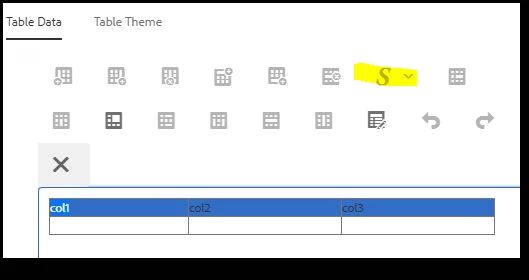
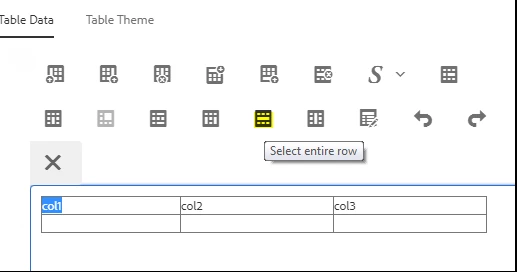
In touch ui dialog in RTE table  want to add a style to row .When i select a row on table the style option is getting disabled .Due to this styles cannot be applied to row.


Is there a way we can enable the style when selecting a row on touch ui for tables.


Thanks



This post is no longer active and is closed to new replies. Need help? Start a new post to ask your question.
arunpatidar
arunpatidarAccepted solution
New Participant
Jun 27, 2020 7:01 PM UTC

The style may not be allowed because styles plugin add style using span and for table row(tr) may not be allowed.

Check this if helps https://experienceleaguecommunities.adobe.com/t5/adobe-experience-manager/change-styles-for-table-rte-plugin-in-touch-ui/qaq-p/364991

Arun Patidar

1 reply

arunpatidar
arunpatidarAccepted solution
New Participant
Jun 27, 2020 7:01 PM UTC

The style may not be allowed because styles plugin add style using span and for table row(tr) may not be allowed.

Check this if helps https://experienceleaguecommunities.adobe.com/t5/adobe-experience-manager/change-styles-for-table-rte-plugin-in-touch-ui/qaq-p/364991

Translate
Arun Patidar