AEM 6.3 - using parsys in htl files | Community
Skip to main content
brendanf9753525
New Participant
July 12, 2017
Solved

AEM 6.3 - using parsys in htl files

  • July 12, 2017
  • 25 replies
  • 23189 views

[Thread Edited By Adobe]

/*Don’t forget to meet and greet your fellow peers virtually by telling them about yourself here

Go ahead and to it now: https://adobe.ly/3eDnB4v */


Actual Post:

Hi All,


I am working with a HTL template and wanted to add some parsys components so we can make changes from the front end interface. Adding images, specifically.


My question is in regards to parsys resources. I have these tags in my html.

   <div class="logo" style="height:100px;">

           <sly data-sly-resource="${ @ resourceType='wcm/foundation/components/parsys'}"></sly>

   </div>


The problem is that from the front end editor these show as very tiny lines, and its impossible to click them. And if I click them and add an image to them, I have to refresh my browser because the changes aren't reflected in my current session. I don't see any errors in the console log.



Is there something I need to do to make these bigger? Viewing the source shows them having a class as container is-disabled. Could that be my issue? I can add a new component to the ones I can click, but clicking them is the hard part. If you also have any ideas for why I may have to refresh the browser for any changes to show up. (I.E, I add a new image but the option to configure it does not show up until I refresh the page)


<div data-type="Editable" data-path="/content/vhhomecare/Home/jcr:content/left-par" tabindex="0" draggable="false" class="cq-Overlay cq-Overlay--component cq-Overlay--container is-disabled" title="Paragraph System - HTL [Root]" style="top: 224px; left: 8px; width: 1887px; height: 37px;"><span title="Paragraph System - HTL [Root]" class="cq-Overlay--component-name">Paragraph System - HTL [Root]</span><div data-type="Editable" data-path="/content/vhhomecare/Home/jcr:content/left-par/*" tabindex="0" draggable="false" data-text="Drag components here" title="Paragraph System - HTL [Root]" class="cq-Overlay cq-Overlay--component cq-droptarget cq-Overlay--placeholder is-selected is-active" style="top: 0px; left: 0px; width: 1887px; height: 0px;"></div>
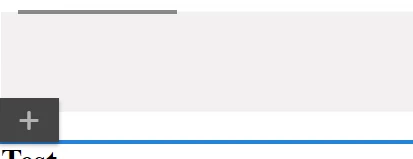


Let me know what you guys think or if I'm even doing this the right way, thanks for your help.


-Brendan



This post is no longer active and is closed to new replies. Need help? Start a new post to ask your question.
Best answer by brendanf9753525

Hi Zeeshank,

Thanks for your responses, I was able to figure out my problem! I needed to add an image as one of the allowed components in the design tab before I could click them in the edit tab. It had no allowed components so it wasn't clickable.

They are still very small and every time I add a component to a parsys, I need to refresh the browser to get it to update. Any ideas why this would be happening?

Not the worst, but at least I can add things again!

Thanks

Brendan

25 replies

arpit-rathi
New Participant
April 22, 2020

Hi, add this to your page component.

<sly data-sly-include="/libs/wcm/core/components/init/init.jsp" data-sly-unwrap/>

'

AdobeID24
New Participant
July 13, 2019

Hey,

can you help me out ?

I got this but I am not able to click that parsys so that i can configure any component .

AdobeID24
New Participant
July 13, 2019

Hello Facing the same issue ..even if i got the full height parsys . it is not clickable .if it is not clickable in desgin mode how i can allow component for this page ?

ebin_Aby
New Participant
July 12, 2019

Any reason why we are seeing this issue suddenly

tejasviganga
New Participant
May 3, 2018

Hi,

Please delete homepage.jsp and it will work.

Thanks,

Tejasvi

New Participant
November 3, 2017

The parsys itself is just super tiny and unclickable. I had also faced the same issue and I figured out that:

we need to initialize the Experience Manager authoring UI by including the following code:

<!--/* Initializes the Experience Manager authoring UI */-->

<sly data-sly-include="/libs/wcm/core/components/init/init.jsp" data-sly-unwrap/>

Once you do this parsys comes like this:

KbdNoOni
New Participant
September 21, 2017

I've just had the same problem (0 height parsys) and it was fixed by the inclusion of the line: <div data-sly-include="head.html"></div>

With the following code I had a 0 height parsys:

<h4>Hello world! 3</h4>

<div data-sly-resource="${@path='par', resourceType='foundation/components/parsys'}"></div>

With the following code I had a 46px height parsys:

<h4>Hello world! 3</h4>

<div data-sly-include="head.html"></div>

<div data-sly-resource="${@path='par', resourceType='foundation/components/parsys'}"></div>

brendanf9753525
New Participant
July 13, 2017

Hey Zeeshank,

It's removed. I didn't have any lucky with that, it looks like it is an internal library that is giving me the issue.

If I view the page outside of the editor it's HTML looks like this

Inside the editor, specifically where the parsys is, it looks like this. You can see the height:0 px on the sidebar indicating why it is basically hidden, showing in the style=""

zeeshanKhan0786
New Participant
July 13, 2017

Can you remove all ClientLib(css and js) loaded into the page and clear the browser cache and then reload the page.

brendanf9753525
New Participant
July 13, 2017

Hey Zeeshank,

Here is the page with the component. I can add an image

After adding the image it looks like this until I refresh my browser

Then refreshing it looks like this

And with no components added and none allowed  in design mode it looks like this

Here is the page screenshot in preview mode

Body.html screenshot

Let me know what you think and I appreciate the time

Brendan