AEM 6.5 Assets Http Api - 404 error for tif assets | Community
Skip to main content
Level 3
Oct 29, 2020 2:39 PM UTC
Solved

AEM 6.5 Assets Http Api - 404 error for tif assets

Hi All,

I have written a python script to update one of the property for all assets under a folder using assets http api. It's a PUT request to update the property. The script works fine for PNGs, PDFs but not for tif assets, it is throws a Resource Not Found, 404 error.

For example: http://localhost:4502/api/assets/skm-local/Capture.PNG works and I get 200 back. But http://localhost:4502/api/assets/skm-local/test.tif does not work and I get 404 return. I get the same result when I try this requests in postman.


Even the GET requests via postman return the same results for above URLs. The png gets returned fine but for tif I get 404. Is this a expected behavior for tif files? Does assets http api not support tif formatted assets?


Thanks & Best Regards,

SKM
This post is no longer active and is closed to new replies. Need help? Start a new post to ask your question.
davidjgonzalezzzzAccepted solution
Employee
Oct 29, 2020 3:01 PM UTC

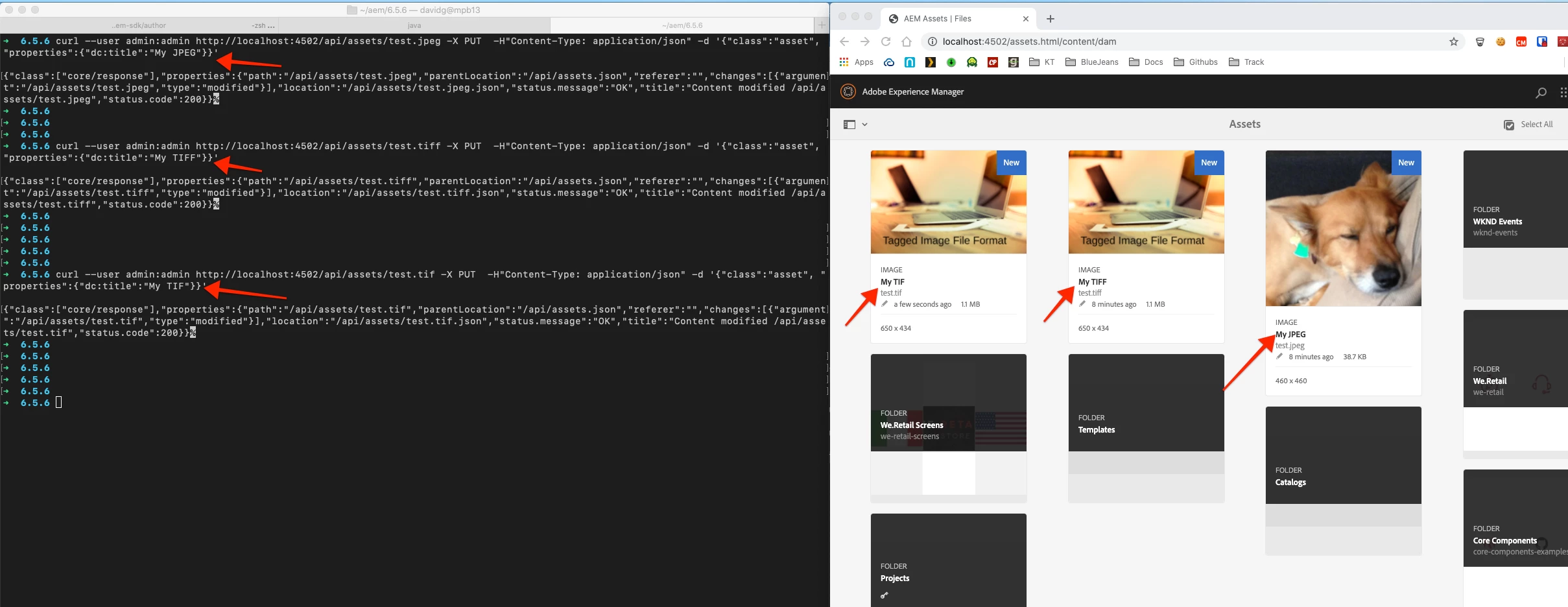
This works just fine on AEM 6.5.6 for me.

Try issuing these Curl commands (updating user/pass, path as needed)


  • curl --user admin:admin http://localhost:4502/api/assets/test.jpeg -X PUT -H"Content-Type: application/json" -d '{"class":"asset", "properties":{"dc:title":"My JPEG"}}'
  • curl --user admin:admin http://localhost:4502/api/assets/test.tiff -X PUT -H"Content-Type: application/json" -d '{"class":"asset", "properties":{"dc:title":"My TIFF"}}'
  • curl --user admin:admin http://localhost:4502/api/assets/test.tif -X PUT -H"Content-Type: application/json" -d '{"class":"asset", "properties":{"dc:title":"My TIF"}}'


If you are able to download the original rendition and open it (showing there is nothing wrong with streaming the bits off the original rendition JCR node) then im not sure ... Since you can update other Tiff's it sounds like there is something weird w/ this Tif's manifestation in AEM. You could try re-uploading the downloaded orginal as a NEW asset and see if that asset has the same problem. If so, maybe there is something w/ that tiff? All and all, HTTP Assets API supports PUT requests for Tif's. If you need to understand why this specific Tif is misbehaving, Adobe Support should be able to help you dig deeper.


23 replies

arunpatidar
New Participant
Oct 29, 2020 8:19 PM UTC

Hi,

It works for me as well.


The error could be because of if Asset could not be found or accessed at the provided URI.

Can you try to access tiff files in the browser?


Translate
Arun Patidar
skmAemAuthor
Level 3
Oct 30, 2020 2:20 PM UTC

Hi @arunpatidar, Yes I am able to access the tiff file in the browser just fine.

I guess preview is not supported for the original rendition but i can click on other renditions and they seem to load fine.

Regards,

SKM


Translate
skmAemAuthor
Level 3
Oct 29, 2020 4:20 PM UTC

Hi @davidjgonzalezzzz ,

Here is the screenshot you requested:


-SKM

Translate
skmAemAuthor
Level 3
Oct 29, 2020 3:28 PM UTC

Hi @davidjgonzalezzzz ,

Thanks for your quick response. I tried the sample curl commands and I still get the 404 for tif file. I am on 6.5.6.0. Here are the commands and outputs from a terminal:


$ curl --user admin:admin http://localhost:4502/api/assets/skm-local/test.tif -X PUT -H"Content-Type: application/json" -d '{"class":"asset", "properties":{"dc:title":"My TIF"}}'

{"class":["core/response"],"properties":{"path":"/api/assets/skm-local/test.tif","parentLocation":"/api/assets/skm-local.json","referer":"","changes":[],"location":"/api/assets/skm-local/test.tif.json","status.message":"No resource found at /api/assets/skm-local/test.tif","status.code":404}}


$curl --user admin:admin http://localhost:4502/api/assets/skm-local/Capture.PNG -X PUT -H"Content-Type: application/json" -d '{"class":"asset", "properties":{"dc:title":"My TIF"}}'

{"class":["core/response"],"properties":{"path":"/api/assets/skm-local/Capture.PNG","parentLocation":"/api/assets/skm-local.json","referer":"","changes":[{"argument":"/api/assets/skm-local/Capture.PNG","type":"modified"}],"location":"/api/assets/skm-local/Capture.PNG.json","status.message":"OK","title":"Content modified /api/assets/skm-local/Capture.PNG","status.code":200}}


Thanks,

SKM


Translate
davidjgonzalezzzzAccepted solution
Employee
Oct 29, 2020 3:01 PM UTC

This works just fine on AEM 6.5.6 for me.

Try issuing these Curl commands (updating user/pass, path as needed)


  • curl --user admin:admin http://localhost:4502/api/assets/test.jpeg -X PUT -H"Content-Type: application/json" -d '{"class":"asset", "properties":{"dc:title":"My JPEG"}}'
  • curl --user admin:admin http://localhost:4502/api/assets/test.tiff -X PUT -H"Content-Type: application/json" -d '{"class":"asset", "properties":{"dc:title":"My TIFF"}}'
  • curl --user admin:admin http://localhost:4502/api/assets/test.tif -X PUT -H"Content-Type: application/json" -d '{"class":"asset", "properties":{"dc:title":"My TIF"}}'


If you are able to download the original rendition and open it (showing there is nothing wrong with streaming the bits off the original rendition JCR node) then im not sure ... Since you can update other Tiff's it sounds like there is something weird w/ this Tif's manifestation in AEM. You could try re-uploading the downloaded orginal as a NEW asset and see if that asset has the same problem. If so, maybe there is something w/ that tiff? All and all, HTTP Assets API supports PUT requests for Tif's. If you need to understand why this specific Tif is misbehaving, Adobe Support should be able to help you dig deeper.


Translate
skmAemAuthor
Level 3
Oct 29, 2020 3:20 PM UTC
Hi David, I tried the curl commands and again the same re
Translate