AEM 6.5 Copy/Paste not working | Community
Skip to main content
New Participant
February 4, 2022
Solved

AEM 6.5 Copy/Paste not working

  • February 4, 2022
  • 1 reply
  • 2647 views

Hi All, 

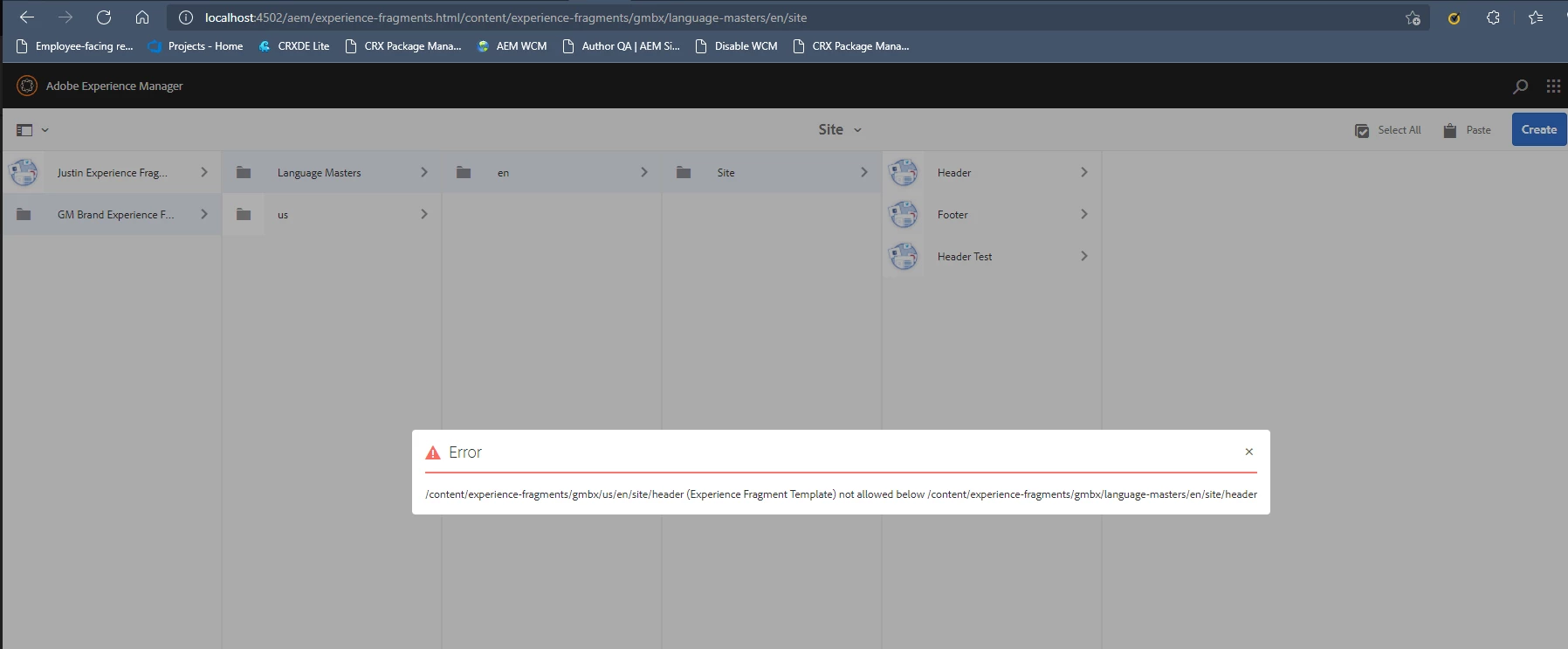
I am having a hard time figuring out if it is possible to copy and paste a Experience Fragment Template into another folder. When I try to do so, I will get this error. In the example below I was trying to copy and paste a Header(Experience Fragment) from "us" to the site folder in "Language Masters"


This post is no longer active and is closed to new replies. Need help? Start a new post to ask your question.
Best answer by Bhuwan_B

@justinbr17 This issue seems to happen from cq:allowedTemplates property that we configure at root level Ex: "/content/experience-fragments". For some reason inheritance doesn't seem to work for that property at subfolder level. Please copy that property to subfolders and it will let you copy experience fragment within folders.


Note: I recommend raising a Ticket with Adobe and find a permanent fix for this issue.

1 reply

Bhuwan_B
Bhuwan_BAccepted solution
New Participant
February 4, 2022

@justinbr17 This issue seems to happen from cq:allowedTemplates property that we configure at root level Ex: "/content/experience-fragments". For some reason inheritance doesn't seem to work for that property at subfolder level. Please copy that property to subfolders and it will let you copy experience fragment within folders.


Note: I recommend raising a Ticket with Adobe and find a permanent fix for this issue.

New Participant
February 4, 2022

Hi, 

I was trying to do what you suggested above and I'm still not able to paste the Header(Experience Fragment) anywhere. I copied the cq:allowedTemplates and paste it inside the subfolder in /content/experience-fragments.

 My cq:allowedTemplates values are 

/libs/cq/experience-fragments/components/experiencefragment/template
/libs/settings/screens/experience-fragments/templates/experience-fragment-template-screens
/conf/we-retail-screens/settings/wcm/templates/experience-fragment-screens-variation
/conf/we-retail/settings/wcm/templates/experience-fragment(.*)?


Did I miss anything?

New Participant
March 3, 2022

Having same issue. I am not able to move the experience fragment from parent folder to child. Copy pasted the allowedTemplates property still having same issue. Any help?